面向对象之设计模式
创建型模式
创建型模式提供了创建对象的机制, 能够提升已有代码的灵活性和可复用性。
工厂方法 Factory Method
意图
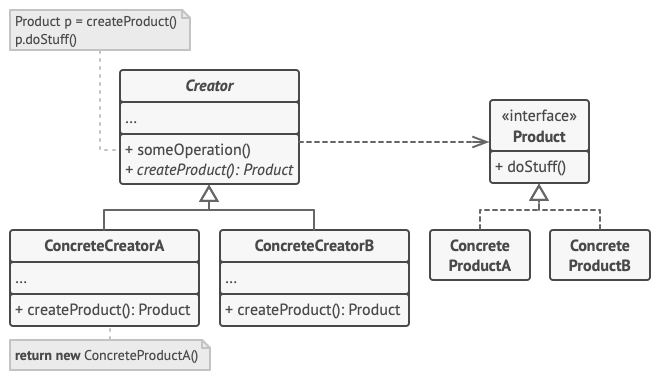
父类中提供创建对象的接口,但是允许子类修改需要创建对象的类型
问题
创建物流管理类,起先实现了火车类,随着业务的增长,需要进行水路运输。
在修改物流管理类时,需要修改所有运输的代码。
解决方案
工厂方法通过调用特殊的工厂方法替代直接使用构造方法构建对象,通过工厂方法返回的对象称之为产品。
UML 结构
 1
 2
 3
 4
 5
 6
 7
 8
 9
10
11
12
13
14
15
16
17
18
19
20
21
22
23
| interface Product{
-doStuff()
}
class ConcreteProductA{
}
class ConcreteProductB{
}
class Creator{
+someOperation()
+createProduct(): Product
}
class ConcreteCreatorA{
}
class ConcreteCreatorB{
}
ConcreteProductA ..|> Product
ConcreteProductB ..|> Product
ConcreteCreatorA --|> Creator
ConcreteCreatorB --|> Creator
Creator --> Product
|
- Product 抽象产品接口
- ConcreteProduct 产品类
- Creator 抽象工厂方法,依赖抽象产品接口
- ConcreteCreator 工厂方法

应用示例
多平台 UI 元素
 1
 2
 3
 4
 5
 6
 7
 8
 9
10
11
12
13
14
15
16
17
18
19
20
21
22
23
24
25
26
27
28
29
30
31
32
33
34
35
36
37
38
39
40
41
42
43
44
45
46
47
48
49
50
51
52
53
54
55
| #!/usr/bin/env python3
from abc import ABCMeta, abstractmethod
class Button(metaclass=ABCMeta):
@abstractmethod
def render(self):
pass
@abstractmethod
def on_click(self):
pass
class WindowsButton(Button):
def render(self):
print(self.__class__.__name__)
def on_click(self):
print(self.__class__.__name__+'click')
class LinuxButton(Button):
def render(self):
print(self.__class__.__name__)
def on_click(self):
print(self.__class__.__name__+'click')
class Dialog(object):
def render(self):
ok_button = self.create_button()
ok_button.on_click()
ok_button.render()
@abstractmethod
def create_button(self):
pass
class WindowsDialog(Dialog):
def create_button(self):
return WindowsButton()
class LinuxDialog(Dialog):
def create_butoon(self):
return LinuxButton()
if __name__ == '__main__':
dailog = WindowsDialog()
dailog.render()
|
适用性
- 事先不知道应使用对象的确切类型和依赖关系
- 为库或框架提供内部组件拓展
- 重用已存在对象而不是每次新建对象,以节约系统资源
实现步骤
- 创建所有产品的接口
- 创建者中添加空的工厂方法,返回类型为抽象产品
- 将创建者代码中所有产品构造函数引用处替换成工厂方法,并将产品创建代码提取到工厂方法中
- 构造创建者子类对象,复写工厂方法
- 如果基类工厂方法为空,可以声明为抽象方法
优缺点
抽象工厂 Abstract Factory
意图
不指定具体工厂类生产一系列相关产品的族
问题
生产家具族,具体的家具有不同的变种。如何在不改动原有代码的情况下生产新的产品或族
解决方案
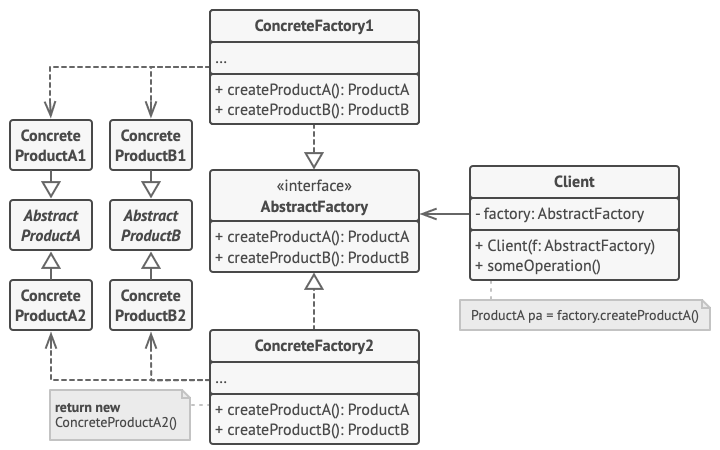
首先声明产品族的接口,通过接口衍生处不同的产品;接着声明具有创建产品族的方法抽象工厂;
最后通过抽象工厂衍生具体工厂类,生产需要的产品族。
UML 结构
 1
 2
 3
 4
 5
 6
 7
 8
 9
10
11
12
13
14
15
16
17
18
19
20
21
22
23
24
25
26
27
28
| interface ProductA
interface ProductB
class ConcreteProductA1
class ConcreteProductA2
class ConcreteProductB1
class ConcreteProductB2
interface AbstractFactory{
+createProduct(): ProductA
+createProduct(): ProductB
}
class ConcreteFactory1
class ConcreteFactory2
class Client{
- factory: AbstractFactory
+ Client(f: AbstractFactory)
+ someOperation()
}
ConcreteFactory1 ..|> AbstractFactory
ConcreteFactory2 ..|> AbstractFactory
ConcreteProductA1 ..|> ProductA
ConcreteProductA2 ..|> ProductA
ConcreteProductB1 ..|> ProductB
ConcreteProductB2 ..|> ProductB
ConcreteFactory1 ..> ConcreteProductA1
ConcreteFactory1 ..> ConcreteProductB1
ConcreteFactory2 ..> ConcreteProductA2
ConcreteFactory2 ..> ConcreteProductB2
Client o--> AbstractFactory
|
- AbstractFactory 抽象工厂接口
- Product 抽象产品
- ConcreteFactory 具体工厂
- ConcreteProduct 具体产品
应用示例
跨平台 UI 主题
 1
 2
 3
 4
 5
 6
 7
 8
 9
10
11
12
13
14
15
16
17
18
19
20
21
22
23
24
25
26
27
28
29
30
31
32
33
34
35
36
37
38
39
40
41
42
43
44
45
46
47
48
49
50
51
52
53
54
55
56
57
58
59
60
61
62
63
64
65
66
67
68
69
70
71
| #!/usr/bin/env python3
from abc import ABCMeta, abstractmethod
class Button(metaclass=ABCMeta):
pass
class CheckBox(metaclass=ABCMeta):
pass
class WinButton(Button):
pass
class WinCheckBox(CheckBox):
pass
class Button(Button):
pass
class CheckBox(CheckBox):
pass
class GUIFactory(metaclass=ABCMeta):
@abstractmethod
def create_button(self):
pass
@abstractmethod
def create_checkbox(self):
pass
class WinFactory(GUIFactory):
def create_button(self):
print(self.__class__.__name__ + 'button')
return WinButton()
def create_checkbox(self):
print(slef.__class__.__name__ + 'checkbox')
return WinCheckBox()
class MacFactory(GUIFactory):
def create_button(self):
print(self.__class__.__name__ + 'button')
return MacButton()
def create_checkbox(self):
print(slef.__class__.__name__ + 'checkbox')
return MacCheckBox()
class Application(object):
def __init__(self, factory):
self.factory = factory
def create_ui(self):
self.button = factory.create_button()
if __name__ == '__main__':
factory = WinFactory()
app = Application(factory)
app.create_ui()
|
适用性
- 需要生产一系列相关产品族,但是不希望具体类依赖这些产品
实现步骤
- 抽象处不同产品的类型
- 声明抽象产品接口
- 声明抽象工厂接口
- 实现具体工厂类和具体产品
- 创建工厂初始化代码,实例化具体工厂类
优缺点
创建者 Builder
意图
逐步构造复杂的对象,可使用相同的构造代码生成对象的不同类型和表示形式。
问题
多步创建复杂对象,如创建房子需要创建车库、花园、游泳池等部分。一种方法是通过房子基类衍生不同的特定子类,
新增参数必须引入多个子类,最终层级过于复杂,另一种方法创建包含选项的构造函数控制生成的对象,使得参数判断变得复杂。
解决方案
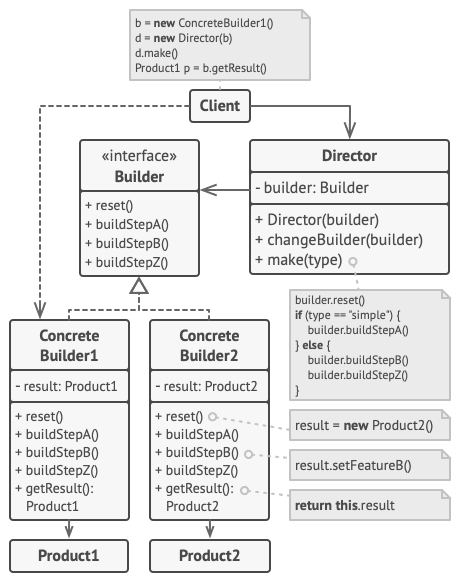
分解创建过程成不同的步骤的创建者,随后根据需求调用创建者对象。
由于构建复杂,可对用于构建产品的构建器步骤的一系列调用提取到一个单独的指挥类中,
指挥类定义了执行创建步骤的顺序,而创建者提供了这些步骤的实现。
UML 结构
 1
 2
 3
 4
 5
 6
 7
 8
 9
10
11
12
13
14
15
16
17
18
19
20
21
22
23
24
25
26
27
28
29
30
31
32
33
34
35
36
| interface Builder{
+ reset()
+ buildStepA()
+ buildStepB()
+ buildStepC()
}
class ConcreteBuilder1{
- result: Product1
+ reset()
+ buildStepA()
+ buildStepB()
+ buildStepC()
+ getResult(): Product1
}
class ConcreteBuilder2{
- result: Product2
+ reset()
+ buildStepA()
+ buildStepB()
+ buildStepC()
+ getResult(): Product2
}
class Director{
- builder: Builder
+ Director(builder)
+ changeBuilder(builder)
+ make(type)
}
ConcreteBuilder1 ..|> Builder
ConcreteBuilder2 ..|> Builder
ConcreteBuilder1 --> Product1
ConcreteBuilder2 --> Product2
Director o--> Builder
Client --> Director
Client --> ConcreteBuilder1
|
- Builder 创建者接口
- ConcreteBuilder 具体创建者
- Director 指挥者
应用示例
创建多种不同类型的车及其手册,通过创建者分解不同的步骤
  1
  2
  3
  4
  5
  6
  7
  8
  9
 10
 11
 12
 13
 14
 15
 16
 17
 18
 19
 20
 21
 22
 23
 24
 25
 26
 27
 28
 29
 30
 31
 32
 33
 34
 35
 36
 37
 38
 39
 40
 41
 42
 43
 44
 45
 46
 47
 48
 49
 50
 51
 52
 53
 54
 55
 56
 57
 58
 59
 60
 61
 62
 63
 64
 65
 66
 67
 68
 69
 70
 71
 72
 73
 74
 75
 76
 77
 78
 79
 80
 81
 82
 83
 84
 85
 86
 87
 88
 89
 90
 91
 92
 93
 94
 95
 96
 97
 98
 99
100
101
102
103
104
105
106
107
| #!/usr/bin/env python3
from abc import ABCMeta, abstractmethod
class Car(object):
pass
class CarManual(object):
pass
class SportEngine(object):
pass
class Builder(metaclass=ABCMeta):
@abstractmethod
def reset(self):
pass
@abstractmethod
def set_seats(self, number):
pass
@abstractmethod
def set_engine(self, engine):
pass
@abstractmethod
def set_trip_computer(self, *args):
pass
@abstractmethod
def set_gps(self, *args):
pass
class CarBuilder(Builder):
def reset(self):
self._car = Car()
print(self.__class__.__name__ + 'reset')
def set_seats(self, number):
print(self.__class__.__name__ + 'set seats')
def set_engine(self, engine):
print(self.__class__.__name__ + 'set engine')
def set_trip_computer(self, *args):
print(self.__class__.__name__ + 'set trip computer')
def set_gps(self, *args):
print(self.__class__.__name__ + 'set gps')
def get_result(self):
return self._car
class CarManualBuilder(Builder):
def reset(self):
self._car_manual = CarManual()
print(self.__class__.__name__ + 'reset')
def set_seats(self, number):
print(self.__class__.__name__ + 'set seats')
def set_engine(self, engine):
print(self.__class__.__name__ + 'set engine')
def set_trip_computer(self, *args):
print(self.__class__.__name__ + 'set trip computer')
def set_gps(self, *args):
print(self.__class__.__name__ + 'set gps')
def get_result(self):
return self._car_manual
class Director(object):
def set_builder(self, builder):
self.builder = builder
def construct_sports_car(self, builder):
if not builder:
builder = self.builder
builder.reset()
builder.set_seats(2)
builder.set_engine(SportEngine())
builder.set_trip_computer(True)
builder.set_gps(True)
def construct_SUV(self, builder):
pass
if __name__ == '__main__':
director = Director()
builder = CarBuilder()
director.construct_sports_car(builder)
car = builder.get_result()
manual_builder = CarManualBuilder()
director.construct_sports_car(manual_builder)
manual = manual_builder.get_result()
|
适用性
实现步骤
- 确保可抽象出可以创建不同表示产品的共同步骤
- 声明创建者接口
- 创建具体创建者类,需要实现获取产品类方法,如果产品类型相同可在接口中实现
- 创建指挥类
- 使用创建类与指挥类
优缺点
原型模式
意图
不依赖对象类代码复制已存在的对象
问题
通过创建新对象遍历对象属性复制的方法,可能会忽略私有属性,导致复制不完全
解决方案
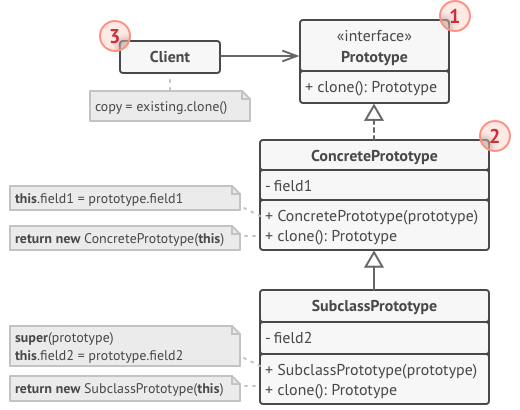
原型模式将复制过程委派给被复制的对象,模式声明一个统一的接口,让接口支持复制对象,而无需将代码与对象类耦合。
UML 结构
 1
 2
 3
 4
 5
 6
 7
 8
 9
10
11
12
13
14
15
16
17
18
19
| interface Prototype{
+ clone(): Prototype
}
class ConcretePrototype{
- field1
+ ConcretePrototype(prototype)
+ clone(): Prototype
}
class SubclassPrototype{
- field2
+ SubclassPrototype(prototype)
+ clone(): Prototype
}
ConcretePrototype ..|>Prototype
SubclassPrototype --|>ConcretePrototype
Client --> Prototype
|
- Prototype 原型接口
- ConcretePtototype 具体原型,实现复制方法
- Client 客户端调用
原型注册表实现
 1
 2
 3
 4
 5
 6
 7
 8
 9
10
11
12
13
14
15
16
17
18
19
20
21
22
23
24
| interface Prototype{
+ getColor(): string
+ clone(): Prototype
}
class PrototypeRegistry{
- items: Prototype[]
+ addItem(id: string, p:Prototype)
+ getById(id: string): Prototype
+ getByColor(color: string): Prototype
}
class Button{
- x,y,color
+ Button(x,y,color)
+ BUtton(prototype)
+ getColor(): string
+ clone(): Prototype
}
class Client{
}
Client --> PrototypeRegistry
PrototypeRegistry o--> Prototype
Button ..|> Prototype
|
原型注册表提供了一种访问常用原型的简单方法, 其中存储了一系列可供随时复制的预生成对象。
python example
应用示例
复制几何对象副本
 1
 2
 3
 4
 5
 6
 7
 8
 9
10
11
12
13
14
15
16
17
18
19
20
21
22
23
| abstract class Shape{
- x, y
- color
+ Shape(source)
+ clone()
}
class Recangle{
- width
- height
+ Rectangle()
+ clone()
}
class Circle{
- radius
+ Circle()
+ clone()
}
Rectangle --|> Shape
Circle --|> Shape
Application o--> Shape
|
 1
 2
 3
 4
 5
 6
 7
 8
 9
10
11
12
13
14
15
16
17
18
19
20
21
22
23
24
25
26
27
28
29
30
31
32
33
34
35
36
37
38
39
40
41
42
43
44
45
46
47
48
49
50
51
52
53
54
55
56
57
58
| #!/usr/bin/env python3
from abc import ABCMeta, abstractmethod
class Shape(metaclass=ABCMeta):
def __init__(self, x=None, y=None, color=None):
self.x = x
self.y = y
self.color = color
@abstractmethod
def clone(self)
pass
class Rectangle(Shape):
def __init__(self, w=None, h=None):
super().__init__()
self.w = w
self.h = h
def clone(self):
return Rectangle(self.x, self.y)
class Circle(Shape):
def __init__(self, radius=None):
super().__init__()
self.radius = radius
def clone(self):
return Circle(self.x)
class Application(object):
def __init__(self):
circle = Circle()
circle.x = 10
circle.y = 10
self.shapes = list()
self.shapes.append(circle)
self.shapes.append(circle.clone())
rectangle = Rectangle()
rectangle.w = 10
rectangle.h = 20
self.shapes.append(rectangle)
def clone_all(self):
ret = list()
for i in self.shapes:
ret.append(i.clone())
return ret
if __name__ == '__main__':
app = Application()
app.clone_all()
|
适用性
- 需要复制对象,又希望代码独立于对象所属的类
- 子类的区别在于对象初始化的方式,可使用该模式减少子类数量
实现步骤
- 创建原型接口,声明克隆方法
- 定义额外的构造函数
- 实现克隆方法
- 可选的丝线注册表类管理常用原型
优缺点
单例模式
意图
确保类仅有单一的实例,提供全局统一访问入口
问题
- 确保仅有一个实例,常用于限制访问共享资源
- 为该实例提供一个全局访问入口
- 违反了单一职责原则
解决方案
UML 结构
1
2
3
4
5
6
7
8
9
| class Singleton{
- instance: Singleton
- Singleton()
+ getInstance(): Singleton
}
class Client{
}
Client --> Singleton
|
- Singleton 单例类:私有化构造函数,定义静态方法
应用示例
数据库访问类
 1
 2
 3
 4
 5
 6
 7
 8
 9
10
11
12
13
14
15
16
17
18
19
20
21
22
23
24
25
26
27
28
29
30
31
32
33
34
35
36
37
38
39
40
41
42
43
44
45
46
47
48
49
50
51
52
53
54
55
56
57
58
59
60
61
62
63
64
65
66
67
68
| #!/usr/bin/env python3
from abc import ABCMeta, abstractmethod
import threading
class SingletonMeta(type):
def __init__(self, *args, **kwargs):
self._instance = None
self.single_lock = Lock()
super(SingletonMeta, self).__init__(*args, **kwargs)
def __call__(self, *args, **kwargs):
with self._local:
if self._instance is None:
self._instance = super(SingletonMeta, self).__call__(*args, **kwargs)
return self._instance
class Database(metaclass=SingletonMeta):
def query(self, *args, **kwargs):
print('{} {} {}'.format(self, args, kwargs))
class Database2(object):
vars = {}
single_lock = threading.Lock()
def __new__(cls, *args, **kwargs):
if cls in cls.vars:
return cls.vars[cls]
cls.single_lock.acquire()
try:
if cls in cls.vars:
return cls.vars[cls]
cls.vars[cls] = super().__new__(cls, *args, **kwargs)
return cls.vars[cls]
finally:
cls.single_lock.release()
def query(self, *args, **kwargs):
print('{} {} {}'.format(self, args, kwargs))
class Application(object):
def main(self, *args, **kwargs):
db = Database()
db.query('haha')
db = Database()
db.query('heihei')
db = Database2()
db.query('haha2')
db = Database2()
db.query('heihei2')
if __name__ == '__main__':
db = Database()
db.query('haha')
db = Database()
db.query('heihei')
db = Database2()
db.query('haha2')
db = Database2()
db.query('heihei2')
|
适用性
- 程序中类的对于所有客户端只有一个可用实例
- 更加严格的控制全局变量
实现步骤
- 私有静态变量
- 声明公共静态方法
- 延迟初始化
- 构造函数私有
优缺点
结构型模式
结构型模式介绍如何将对象和类组装成较大的结构, 并同时保持结构的灵活和高效。
适配器 Adapter
意图
使不兼容的对象能够相互兼容
问题
原有的 XML 接口现在需要对接 JSON 接口,可以修改现有代码库实现,可能核心库未提供源代码,无法修改如何处理?
解决方案
使用一个适配器对象转换接口,使接口能够兼容。
适配器不仅能够转换不同格式的数据,其次还有助于采用不同接口的对象之间的合作
UML 结构
 1
 2
 3
 4
 5
 6
 7
 8
 9
10
11
12
13
14
| interface ClientInterface{
+ method(data)
}
class Adapter{
- adaptee: Service
+ method(data)
}
class Service{
+ serviceMethod(specialData)
}
class Client
Client --> ClientInterface
Adapter ..|> ClientInterface
Adapter o--> Service
|
- ClientInterface 客户端接口,抽象协议
- Service 服务,不兼容接口
- Adapter 适配器,处理接口数据
客户端代码与具体适配器代码解耦,方便修改增加新的适配而不修改代码。
类适配器
 1
 2
 3
 4
 5
 6
 7
 8
 9
10
11
12
13
| class Client
class OlderClass{
+ method(data)
}
class Service{
+ serviceMethod(specialData)
}
class Adapter{
+ method(data)
}
Client --> OlderClass
Adapter --|> OlderClass
Adapter --|> Service
|
多继承语言支持,类适配器不需要封装对象,同时继承客户端和服务端的行为,重写需要的方法即可。
应用示例
不同材料的兼容,方钉和圆孔
 1
 2
 3
 4
 5
 6
 7
 8
 9
10
11
12
13
14
15
16
17
18
19
20
21
22
23
24
| class RoundHole{
- radius: int
+ RoundHole(radius: int)
+ getRadius(): int
+ fits(peg: RoundPeg): bool
}
class RoundPeg{
- radius: int
+ RoundPeg(radius: int)
+ getRadius(): int
}
class SquarePegAdapter{
- peg: SquarePeg
+ SquarePegAdapter(peg: SquarePeg)
+ getRadius(): int
}
class SquarePeg{
- width: int
+SquarePeg(width: int)
+ getWidth(): int
}
RoundHole --> RoundPeg
SquarePegAdapter --|> RoundPeg
SquarePeg <|--o SquarePegAdapter
|
 1
 2
 3
 4
 5
 6
 7
 8
 9
10
11
12
13
14
15
16
17
18
19
20
21
22
23
24
25
26
27
28
29
30
31
32
33
34
35
36
37
38
39
40
41
42
43
44
45
46
47
48
49
50
51
52
53
54
55
56
57
| #!/usr/bin/env python3
import math
class RoundHole(object):
def __init__(self, radius):
self._radius = radius
def get_radius(self):
return self._radius
def fits(self, peg):
ret = self.get_radius() >= peg.get_radius()
print(ret)
return ret
class RoundPeg(object):
def __init__(self, radius):
self._radius = radius
def get_radius(self):
return self._radius
class SquarePeg(object):
def __init__(self, width):
self._width = width
def get_width(self):
return self._width
class SquarePegAdapter(RoundPeg):
def __init__(self, peg):
self._peg = peg
def get_radius(self):
return math.sqrt(self._peg.get_width()) / 2
if __name__ == '__main__':
hole = RoundHole(5)
rpeg = RoundPeg(5)
hole.fits(rpeg)
s_sqpeg = SquarePeg(5)
l_sqpeg = SquarePeg(10)
# hole.fits(s_sqpeg)
s_sqpeg_adapter = SquarePegAdapter(s_sqpeg)
l_sqpeg_adapter = SquarePegAdapter(l_sqpeg)
hole.fits(s_sqpeg_adapter)
hole.fits(l_sqpeg_adapter)
|
适用性
- 希望使用不兼容的接口类时
- 希望复用多个缺少相同功能而无法被添加到父类的子类时
实现步骤
- 确保有两个类接口不兼容
- 声明客户端协议接口
- 创建具体的适配类
- 在适配器中保存需要适配的对象
- 实现兼容方法
优缺点
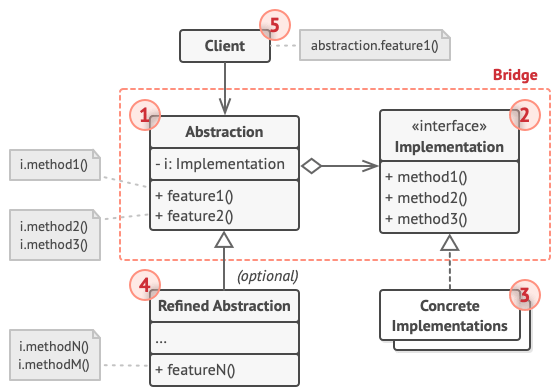
桥接模式
意图
将大类或一系列相关的类炒粉为抽象和实现两个层次结构,可在开发中独立使用
问题
不同的几何图形配合不同的颜色,如果再新增不同的图形,需要新增多个颜色的不同子类
解决方案
通过抽取颜色纬度为独立层次,使初始类中引用这个层次的对象,从而使得一个类不必用所有的状态和行为。
抽象常成为接口是一些实体的高层控制层,不做具体工作,将工作委派给实现层
UML 结构
 1
 2
 3
 4
 5
 6
 7
 8
 9
10
11
12
13
14
15
16
| class Abstraction{
- i: Implementation
+ feature1()
+ feature2()
}
interface Implementation{
+ method1()
+ method2()
}
class ConcreteImplementations
ConcreteImplementations ..|> Implementation
Abstraction o--> Implementation
Client --> Abstraction
RefinedAbstraction --|> Abstraction
|
- Abstraction 抽象部分控制逻辑
- Implementation 实现部分声明通用接口
- ConcreteImplementations 具体实现
- RefinedAbstraction 具体抽象
应用示例
设备与遥控器应用
 1
 2
 3
 4
 5
 6
 7
 8
 9
10
11
12
13
14
15
16
17
18
19
20
21
22
23
24
25
| class Remote{
- device: Device
+ togglePower()
+ volumeDown()
+ volumeUp()
+ channelDown()
+ channelUp()
}
interface Device{
+ isEnabled()
+ enable()
+ disable()
+ getVolume()
+ setVolume(percent)
+ getChannel()
+ setChannel(channel)
}
class Radio
class TV
class AdvancedRemote
Radio ..|> Device
TV ..|> Device
AdvancedRemote --|> Remote
Client --> Remote
|
遥控基类声明了一个设备对象的引用,所有遥控器通过通用设备接口与设备进行交互,使得遥控器可以支持不同类型的设备
 1
 2
 3
 4
 5
 6
 7
 8
 9
10
11
12
13
14
15
16
17
18
19
20
21
22
23
24
25
26
27
28
29
30
31
32
33
34
35
36
37
38
39
40
41
42
43
44
45
46
47
48
49
50
51
52
53
54
55
56
57
58
59
60
61
62
63
64
65
66
67
68
69
70
71
72
73
74
75
76
77
78
79
80
81
82
83
84
85
| #!/usr/bin/env python
# -*- coding: utf-8 -*-
class RemoteControl(object):
def __init__(self, device):
self._device = device
def toggle_power(self):
print('switch power')
if self._device.is_enable():
self._device.disable()
else:
self._device.enable()
def volume_down(self):
print('volume down')
self._device.volume = self._device.volume - 10
def volume_up(self):
print('volume up')
self._device.volume = self._device.volume + 10
def channel_down(self):
print('channel down')
self._device.channel = self._device.channel - 1
def channel_up(self):
print('channel up')
self._device.channel = self._device.channel + 1
class AdvancedRemoteControl(RemoteControl):
def mute(self):
slef._device.volume = 0
class Device(object):
def __init__(self, status=False, volume=50, channel=1):
self._status = status
self._volume = volume
self._channel = channel
def is_enable(self):
return self._status
def enable(self):
self._status = True
def disable(self):
self._status = False
@property
def volume(self):
return self._volume
@volume.setter
def volume(self, v):
self._volume = v
@property
def channel(self):
return self._channel
@channel.setter
def channel(self, v):
self._channel = v
class TV(Device):
pass
class Radio(Device):
pass
tv = TV()
remote = RemoteControl(tv)
remote.toggle_power()
radio = Radio()
remote = AdvancedRemoteControl(radio)
remote.volume_down()
|
适用性
- 需要拆分重组一个具有多重功能的类
- 需要在几个独立纬度拓展一个类
- 在运行时切换不同的实现方法
实现步骤
- 明确类中独立的纬度
- 定义抽象类
- 确认平台可用操作,声明抽象接口
- 平台类实现接口
- 抽象类中添加实现类型的引用
优缺点
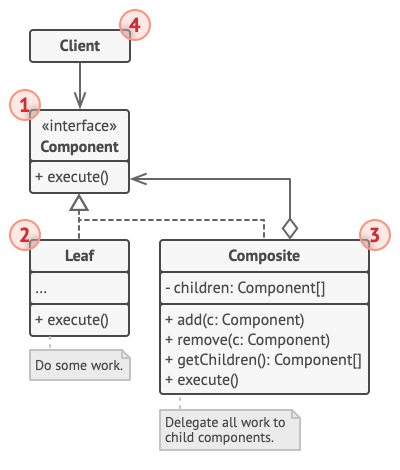
组合模式
意图
将对象组合成树状结构,并能像独立对象一样使用它们
问题
计算订单时,需要去除产品的包装后,再计算订单总金额,计算需要去除包装等因素
解决方案
组合模式建议使用一个通用接口来与包装和产品交互,并且再该接口中声明一个计算总价的方法
UML 结构
 1
 2
 3
 4
 5
 6
 7
 8
 9
10
11
12
13
14
15
16
17
| interface Component{
+ execute()
}
class Leaf{
+ execute()
}
class Composite{
- children: Component[]
+ add(c: Component)
+ remove(c: Component)
+ getChildren(): Component[]
+ execute()
}
class Client
Leaf ..|> Component
Composite ..|> Component
Client --> Component
|
- Component 组件 抽象接口描述共同操作
- Leaf 树节点
- Composite 组合 包含也节点的单位
应用示例
图形编辑器实现一系列图形, 组合图形包含多个子图形,组合图形自身不完成具体工作,将请求传递给自己的子部件,然后合成结果
 1
 2
 3
 4
 5
 6
 7
 8
 9
10
11
12
13
14
15
16
17
18
19
20
21
22
23
24
25
26
| interface Graphic{
+ move(x, y)
+ draw()
}
class Dot{
+ Dot(x, y)
+ move(x, y)
+ draw()
}
class Circle{
radius
+ Circle(x, y, radius)
+ draw()
}
class CompoundGraphic{
- children: Graphic[]
+ add(child: Graphic)
+ remove(child: Graphic)
+ move(x, y)
+ draw()
}
class ImageEditor
ImageEditor --> Graphic
Dot ..|> Graphic
CompoundGraphic ..|> Graphic
Circle --|> Dot
|
 1
 2
 3
 4
 5
 6
 7
 8
 9
10
11
12
13
14
15
16
17
18
19
20
21
22
23
24
25
26
27
28
29
30
31
32
33
34
35
36
37
38
39
40
41
42
43
44
45
46
47
48
49
50
51
52
53
54
55
56
57
58
59
60
61
62
63
64
65
66
67
68
69
70
71
72
73
74
75
76
77
| #!/usr/bin/env python3
from abc import ABCMeta, abstractmethod
class Graphic(metaclass=ABCMeta):
@abstractmethod
def move(self, x, y):
pass
@abstractmethod
def draw(self):
pass
class Dot(Graphic):
def __init__(self, x, y):
self._x = x
self._y = y
def move(self, x, y):
self._x += x
self._y += y
def draw(self):
print('draw graphic')
class Circle(Dot):
def __init__(self, x, y, radius):
super().__init__(x, y)
self._raidus = radius
def draw(self):
print('draw Circle')
class CompoundGraphic(Graphic):
def __init__(self):
self._children = list()
def add(self, child):
self._children.append(child)
def remove(self, child):
self._children.remove(child)
def move(self, x, y):
for i in self._children:
i.move(x, y)
def draw(self):
for i in self._children:
i.draw()
class ImageEditor(object):
def load(self):
self.cg = CompoundGraphic()
self.cg.add(Dot(1, 2))
self.cg.add(Circle(5, 3, 10))
def group_selected(self, components):
group = CompoundGraphic()
group.add(components)
self.cg.add(group)
self.cg.draw()
if __name__ == '__main__':
ie = ImageEditor()
ie.load()
ie.group_selected(Dot(3, 4))
|
适用性
- 需要实现树状对象结构
- 希望客户端以相同的方式处理简单和复杂的元素
实现步骤
- 确保核心模型能分解成简单元素和容器
- 声明组件接口以及一系列方法
- 创建一个也节点类表示简单元素
- 创建一个组合类表示容器的复杂元素。用于储存子元素
- 在容器中定义添加和删除子元素的方法
优缺点
- 利用多态和递归机制方便使用复杂树结构
- 开闭原则
- 对于功能差异大的类,提供公共结构或许会有困难
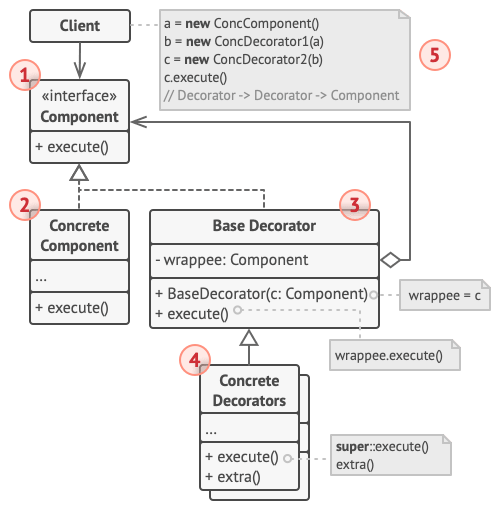
装饰模式
意图
通过对象放入包含行为的特殊封装对象中来为原对象绑定新的行为
问题
通知类中可以发送通知,后续需要增加不同的接受终端和通知方式,如果修改源代码会使代码量快速膨胀和复杂
解决方案
通过装饰器将目标对象的方法进行拓展,而不改变结构名称与参数。上述问题可以实现基类装饰器后,衍生出不同终端和通知方式的装饰器。
UML 结构
 1
 2
 3
 4
 5
 6
 7
 8
 9
10
11
12
13
14
15
16
17
18
19
20
| interface Component{
+ execute()
}
class ConcreteComponent{
+ execute()
}
class BaseDecorator{
- wrappee: Component
+ Decorator(c: Component)
+ execute()
}
class ConcreteDecorators{
+ execute()
+ extra()
}
class Client
Client --> Component
ConcreteComponent ..|> Component
BaseDecorator ..|> Component
ConcreteDecorators --|> BaseDecorator
|
- Component 部件 装饰器和被装饰对象的公共接口
- ConcreteComponent 具体部件 被装饰对象
- BaseDecorator 基类装饰器 通用装饰器接口
- ConcreteDecorators 动态添加行为,改变原有被装饰对象行为
应用示例
装饰模式加密数据
 1
 2
 3
 4
 5
 6
 7
 8
 9
10
11
12
13
14
15
16
17
18
19
20
21
22
23
24
25
26
27
28
29
| interface DataSource{
+ writeData(data)
+ readData()
}
class FileDataSource{
- filename
+ FileDataSource(filename)
+ writeData(data)
- readData()
}
class DataSourceDecorator{
- wrappee: DataSource
+ DataSourceDecorator(s:DataSource)
+ writeData(data)
+ readData()
}
class EncryptionDecorator{
+ writeData(data)
+ readData()
}
class CompresionDecorator{
+ writeData(data)
+ readData()
}
FileDataSource ..|> DataSource
DataSourceDecorator ..|> DataSource
EncryptionDecorator --|> DataSourceDecorator
CompressionDecorator --|> DataSourceDecorator
DataSourceDecorator o--> DataSource
|
 1
 2
 3
 4
 5
 6
 7
 8
 9
10
11
12
13
14
15
16
17
18
19
20
21
22
23
24
25
26
27
28
29
30
31
32
33
34
35
36
37
38
39
40
41
42
43
44
45
46
47
48
49
50
51
52
53
54
55
56
57
58
59
60
61
62
63
64
65
66
67
68
69
70
71
| #!/usr/bin/env python3
from abc import ABCMeta, abstractmethod
class DataSource(metaclass=ABCMeta):
@abstractmethod
def write_data(self, data):
pass
@abstractmethod
def read_data(self):
pass
class FileDataSource(DataSource):
def __init__(self, filename):
self._filename = filename
def write_data(self, data):
print('write data')
def read_data(self):
print('read data')
class DataSourceDecorator(DataSource):
def __init__(self, wrappee):
self._wrappee = wrappee
def write_data(self, data):
print('decorator write data')
self._wrappee.write_data(data)
def read_data(self):
print('decorator read data')
return self._wrappee.read_data()
class EncryptionDecorator(DataSourceDecorator):
def write_data(self, data):
print('encrypt data')
super().write_data(data)
def read_data(self):
print('decrypt data')
super().read_data()
class CompressionDecorator(DataSourceDecorator):
def write_data(self, data):
print('compress data')
super().write_data(data)
def read_data(self):
print('decompress data')
super().read_data()
if __name__ == '__main__':
source = FileDataSource('haha')
source.write_data('abc')
c_source = CompressionDecorator(source)
c_source.write_data('abc')
e_source = EncryptionDecorator(source)
e_source.write_data('abc')
|
适用性
- 不修改代码的情况下增加对象的功能
- 使用继承拓展对象行为难以实现,使用装饰模式
实现步骤
- 确保业务逻辑可用一个基本组件和多个额外可选组件表示
- 找出通用方法,声明接口
- 创建一个具体组件类,定义基础行为
- 创建装饰基类,使用一个成员变量储存被装饰对象
- 确保所有类实现组件接口
- 将装饰基类拓展为具体装饰类,添加额外行为
优缺点
- 无需新建子类即可拓展对象行为
- 运行时添加或删除对象的功能
- 多个装饰器组合几种行为
- 单一职责原则
- 装饰器删除特定装饰器比较困难
- 实现行为不受装饰顺序装饰比较困难
- 各层初始化配置代码比较糟糕
外观模式
意图
使复杂类提供一个简单的接口
问题
代码中使用复杂的库或框架中对象,需要负责所有对象的初始化工作、管理其依赖关系并正确执行。将业务逻辑和第三方类的实现耦合,使代码难以维护。
解决方案
外观模式为许多部件的复杂子系统提供一个简单的接口,不关心内部实现,仅调用需要的功能。
UML 结构
 1
 2
 3
 4
 5
 6
 7
 8
 9
10
11
12
13
14
| class Facade{
- linkToSubsystemObjects
- optionalAdditionFacade
+ subsystemOperation()
}
class AdditionalFacade{
+ anotherOperation()
}
class Client
class Subsystem
Client --> Facade
Facade --> AdditionalFacade
Facade ..> Subsystem
AdditionalFacade ..> Subsystem
|
- Facade 外观 提供特定子系统功能便捷访问
- AdditionalFacade 附加外观 避免多种不相关的功能污染单一外观
- Subsystem 复杂子系统
应用示例
视频转换框架
 1
 2
 3
 4
 5
 6
 7
 8
 9
10
11
| class Application
class VideoConverter{
+ converVideo(filename, format)
}
class AudioMixer
class VideoFile
class CodecFactory
Application --> VideoConverter
VideoConverter ..> VideoFile
VideoConverter ..> AudioMixer
VideoConverter ..> CodecFactory
|
 1
 2
 3
 4
 5
 6
 7
 8
 9
10
11
12
13
14
15
16
17
18
19
20
21
22
23
24
25
26
27
28
29
| #!/usr/bin/env python3
from abc import ABCMeta, abstractmethod
class VideoFile(object):
def __init__(self, filename=None):
self.filename = filename
print(self.__class__.__name__ + 'init')
class CodecFactory(object):
@staticmethod
def extract(file_=None):
print('CodecFactory extract')
class VideoConverter(object):
def convert(self, filename):
file_ = VideoFile(filename)
source_codec = CodecFactory.extract(file_)
return source_codec
if __name__ == '__main__':
convertor = VideoConverter()
mp4 = convertor.convert('adfd')
|
适用性
- 需要一个复杂子系统的直接接口,且该接口功能有限
- 需要将子系统组织为多层结构,减少子系统之间的耦合
实现步骤
- 确认能否在现有子系统的基础上提供一个更简单的接口
- 在外观类中声明并实现接口
- 确保所有客户端代码仅通过外观模式与子系统进行交互
优缺点
- 可以让代码独立与复杂子系统
- 外观可能成为与程序中所有类耦合的类对象
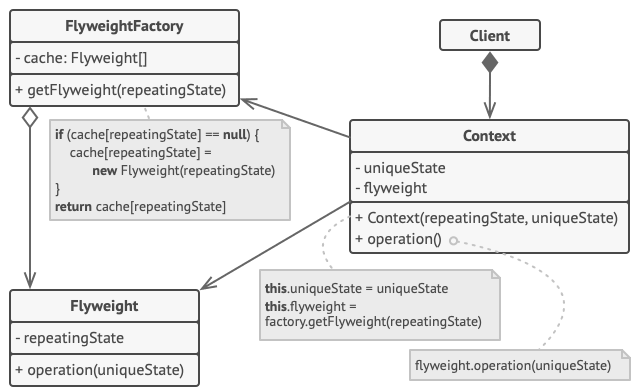
享元模式
意图
享元模式通过共享对象状态,在有限的内存中保存更多的对象
问题
对象过多造成内存不足,程序崩溃
解决方案
对象的常量数据通常被称为固有属性, 其位于对象中, 其他对象只能读取但不能修改其数值。 而对象的其他状态常常能被其他对象 “从外部” 改变, 因此被称为外在属性。
享元模式建议不在对象中存储外在状态, 而是将其传递给依赖于它的一个特殊方法。 程序只在对象中保存固有属性, 以方便在不同情景下重用。
UML 结构
 1
 2
 3
 4
 5
 6
 7
 8
 9
10
11
12
13
14
15
16
17
18
| class FlyweightFactory{
- cache: Flyweight[]
+ getFlyweight(repeationState)
}
class Flyweight{
- repeatingState
+ operation(uniqueState)
}
class Context{
- unniqueState
- flyweight
+ Context(repeatingState, uniqueState)
+ opeartion()
}
class Client
Client *--> Context
Context --> Flyweight
Context --> FlyweightFactory
|
- Flyweight 享元类固有属性
- FlyweightFactory 工厂类
- Context 外在属性类
应用示例
储存多个树对象
 1
 2
 3
 4
 5
 6
 7
 8
 9
10
11
12
13
14
15
16
17
18
19
20
21
22
23
24
25
26
| class TreeType{
- name
- color
- texture
+ TreeType(name, color, texture)
+ draw(canvas, x, y)
}
class Tree{
+ x
+ y
+ type: TreeType
+ draw(canvas)
}
class Forest{
+ tree: Tree[]
+ plantTree(x, y, name, color, texture): Tree
+ draw(canvans)
}
class TreeFactory{
- treeTypes: TreeType[]
+ getTreeType(name, color, texture)
}
TreeFactory o--> TreeType
Tree --> Treetype
Tree --> TreeFactory
Forest o--> Tree
|
 1
 2
 3
 4
 5
 6
 7
 8
 9
10
11
12
13
14
15
16
17
18
19
20
21
22
23
24
25
26
27
28
29
30
31
32
33
34
35
36
37
38
39
40
41
42
43
44
45
46
47
48
49
50
51
52
53
54
55
56
57
58
59
60
61
62
63
64
65
66
| #!/usr/bin/env python3
# -*- coding:utf-8 -*-
class TreeType(object):
def __init__(self, name, color, texture):
self.name = name
self.color = color
self.texture = texture
def draw(self, canvas, x, y):
print('tree type draw')
class TreeFactory(object):
tree_types = list()
@staticmethod
def find_tree(trees, target):
ret = None
if not trees:
return ret
for i in trees:
if i == target:
ret = i
break
return ret
@staticmethod
def get_tree_type(name, color, texture):
tree_type = TreeFactory.find_tree(
TreeFactory.tree_types, (name, color, texture))
if not tree_type:
tree_type = TreeType(name, color, texture)
TreeFactory.tree_types.append(tree_type)
return tree_type
class Tree(object):
def __init__(self, x, y, t):
self.x = x
self.y = y
self.t = t
def draw(self, canvas):
self.t.draw(canvas, self.x, self.y)
class Forest(object):
trees = list()
def plant_tree(self, x, y, name, color, texture):
t = TreeFactory.get_tree_type(name, color, texture)
tree = Tree(x, y, t)
self.trees.append(tree)
def draw(self, canvas):
for tree in self.trees:
tree.draw(canvas)
if __name__ == '__main__':
forest = Forest()
forest.plant_tree(1, 2, 'tree', 'red', 'p')
forest.draw('canvas')
|
适用性
实现步骤
- 分离类属性至两个部分,固有属性;外在属性
- 类中不可变的保留固有属性成员变量
- 找到所耦外在转台成员变量方法,使用参数替代成员变量
- 可选的实现工厂类管理享元缓存池
- 客户端必须储存和计算外在状态的数值
优缺点
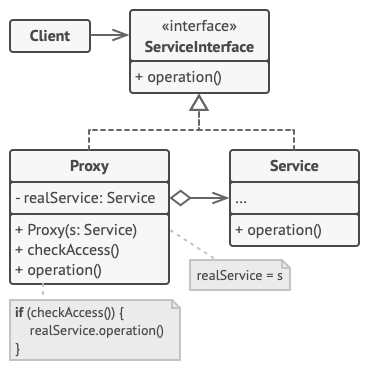
代理模式
意图
代理模式控制原始对象的访问,并允许在将请求提交给对象前后进行一些处理。
问题
大量消耗系统资源的对象,实现懒加载,类中可能存在重复的代码。但对于不能修改代码第三方库,不能实现懒加载。
解决方案
创建一个新的代理类,将操作委托给代理类,可以真实操作前后执行某些操作。
UML 结构
 1
 2
 3
 4
 5
 6
 7
 8
 9
10
11
12
13
14
15
| interface ServiceInterface{
+ opeartion()
}
class Proxy{
- realService: Service
+ Proxy(s: Service)
+ checkAccess()
+ operation()
}
class Service{
+ operation
}
Proxy ..|> ServiceInterface
Service ..|> ServiceInterface
Proxy o--> Service
|
- ServiceInterface 抽象接口
- Proxy 代理类
- Service 真实逻辑类
应用示例
视频懒加载与缓存
 1
 2
 3
 4
 5
 6
 7
 8
 9
10
11
12
13
14
15
16
17
18
19
20
| interface YoutubeLib{
+ listVideos()
+ getVideoInfo(id)
+ downloadVideo(id)
}
class YoutubeVideo{
+ listVides()
+ getVideoInfo(id)
+ downloadVideo(id)
}
class CachedVideo{
- service: YoutubeVideo
+ CachedVideo(s: YoutubeVideo)
+ listVideos()
+ getVideoInfo(id)
+ downloadVideo(id)
}
CachedVideo ..|> YoutubeLib
YoutubeVideo ..|> YoutubeLib
CachedVideo o--> YoutubeVideo
|
 1
 2
 3
 4
 5
 6
 7
 8
 9
10
11
12
13
14
15
16
17
18
19
20
21
22
23
24
25
26
27
28
29
30
31
32
33
34
35
36
37
38
39
40
41
42
43
44
45
46
47
48
49
50
51
52
53
54
55
56
57
58
59
60
61
62
63
64
65
66
67
68
69
70
71
72
73
74
75
76
77
| #! /usr/bin/env python3
# -*- coding:utf-8 -*-
from abc import ABCMeta, abstractmethod
class YoutubeLib(metaclass=ABCMeta):
@abstractmethod
def list_videos(self):
pass
@abstractmethod
def get_video_info(self, id_):
pass
@abstractmethod
def download_video(self, id_):
pass
class YoutubeVideo(YoutubeLib):
def list_videos(self):
print('origin list')
def get_video_info(self, id_):
print('id {} origin info'.format(id_))
def download_video(self, id_):
print('origin download video')
class CachedVideo(YoutubeLib):
def __init__(self, service):
self.service = service
self.list_cache = None
self.video_cache = None
self.need_reset = False
def list_videos(self):
if not self.list_cache or self.need_reset:
self.list_cache = self.service.list_videos()
return self.list_cache
def get_video_info(self, id_):
if not self.video_cache or self.need_reset:
self.video_cache = self.service.get_video_info(id_)
return self.video_cache
def download_video(self, id_):
if self.need_reset:
self.service.download_video(id_)
class YoutubeManager(object):
def __init__(self, service):
self.service = service
def render_video_page(self, id_):
return self.service.get_video_info(id_)
def render_list_panel(self):
return self.service.list_videos()
def react_on_user_input(self, id_):
return self.render_video_page(id_), self.render_list_panel()
if __name__ == '__main__':
youtube_service = YoutubeVideo()
service_proxy = CachedVideo(youtube_service)
manager = YoutubeManager(service_proxy)
ret = manager.react_on_user_input(1)
print(ret)
|
适用性
实现步骤
- 创建代理与服务的接口,备选的方式是将代理作为服务类的子类
- 创建代理类,通常代理负责创建和管理服务
- 实现代理方法,委派给服务对象
- 创建构造方法判断代理还是服务对象,可以用工厂方法代替
- 可选服务对象延迟加载
优缺点
行为模式
行为模式负责对象间的高效沟通和职责委派
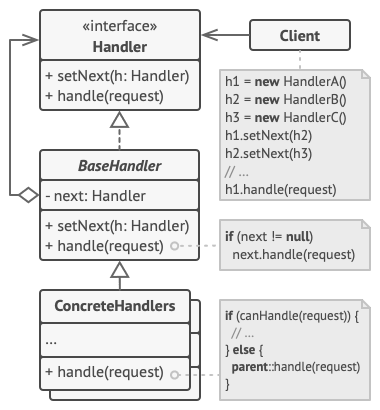
责任链模式
意图
请求发送至责任链。 收到请求后,每个处理者均可对请求进行处理,或将其传递给链上的下个处理者。
问题
在线订单系统,限制非认证用户创建订单,处理认证还需要添加授权、数据验证、缓存等检查,随着功能的增多系统代码越来越复杂。
解决方案
责任链会将特定行为转换为被称作 handler 的独立对象,请求与数据传递给 handler 对象处理。
将多个 handler 串联成链,请求在链上移动并且有计划被 handler 处理。
最重要的是:handler 可以决定不再沿着链传递请求,这可高效地取消所有后续处理步骤。
另一种不同的方式为:对于每个请求如果 handler 可以处理就不会在向后传递。
UML 结构
 1
 2
 3
 4
 5
 6
 7
 8
 9
10
11
12
13
14
| interface Handler{
+ setNext(h: Handler)
+ handle(request)
}
class BaseHandler{
- next: Handler
+ setNext(h: Handler)
+ handle(request)
}
ConcreteHandlers{
+ handle(request)
}
BaseHandler ..|> Handler
ConcreteHandlers --|> BaseHandler
|
- Handler 处理抽象类
- BaseHandler 基础处理类 定义下一个 handler 指针
- ConcreteHandlers 具体处理类
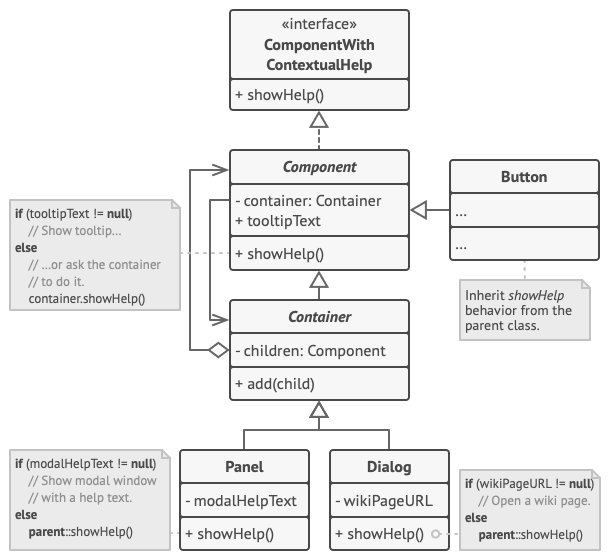
应用示例
GUI 元素显示上下文帮助信息
 1
 2
 3
 4
 5
 6
 7
 8
 9
10
11
12
13
14
15
16
17
18
19
20
21
22
23
24
25
26
27
| interface ComponentWithContextualHelp{
+ showHelp()
}
class Component{
- container: Container
+ tooltipText
+ showHelp()
}
class Button
class Comtainer{
- children: Component
+ add(child)
}
class Panel{
- modalHelpText
+ showHelp()
}
class Dialog{
- wikiPageURL
+ showHelp()
}
Component ..|> ComponentWithContextualHelp
Container o--> Component
Component --> Container
Container --|> Component
Panel --> Container
Dialog --> Container
|
 1
 2
 3
 4
 5
 6
 7
 8
 9
10
11
12
13
14
15
16
17
18
19
20
21
22
23
24
25
26
27
28
29
30
31
32
33
34
35
36
37
38
39
40
41
42
43
44
45
46
47
48
49
50
51
52
53
54
55
56
57
58
59
60
61
62
63
64
65
66
67
68
69
70
71
72
73
74
75
76
| #!/usr/bin/env python3
from abc import ABCMeta, abstractmethod
# 责任链抽象接口
class ComponentWithContextualHelp(metaclass=ABCMeta):
@abstractmethod
def show_help(self):
pass
# 简单组件基础类
class Component(ComponentWithContextualHelp):
def __init__(self, help_text=None):
self.help_text = help_text
self.container = None
def show_help(self):
if self.help_text:
print('component help')
else:
self.container.help()
# 容器类包含组件或其他容器
class Container(Component):
def __init__(self):
super().__init__()
self.children = list()
def add(self, child):
self.children.append(child)
child.container = self
class Button(Component):
pass
class Panel(Container):
def __init__(self, help_text=None):
super().__init__()
self.help_text = help_text
def show_help(self):
if self.help_text:
print('modal_text')
else:
super().show_help()
class Dialog(Container):
def __init__(self, help_text=None):
super().__init__()
self.help_text = help_text
def show_help(self):
if self.help_text:
print('dialog text')
else:
super().show_help()
if __name__ == '__main__':
dialog = Dialog('haha')
panel = Panel('panel')
button = Button('button')
button1 = Button('button1')
panel.add(button)
panel.add(button1)
dialog.add(panel)
dialog.show_help()
|
适用性
- 程序需要不同处理方式处理不同种类的请求,而且请求类型和顺序位置
- 必须按顺序执行处理者
- 如果处理者及其顺序必须在运行是改变,可以使用该模式
实现步骤
- 声明处理者接口并描述请求处理方法
- 为了精简代码可以在处理者接口穿件抽象处理者基类
- 依次创建集体处理者代码
- 客户端可自行组装责任链,或独立工厂类获取
优缺点
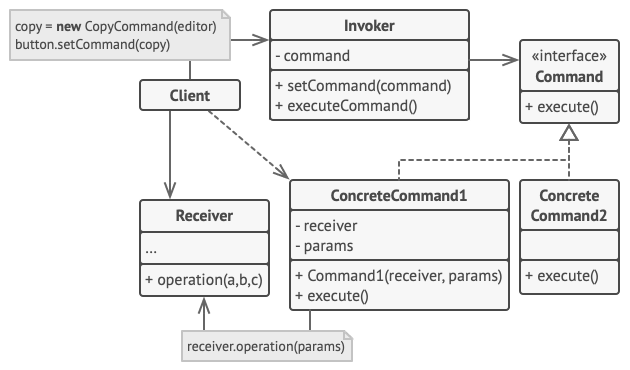
命令模式
意图
将请求转换为一个包含与请求相关的所有信息的独立对象。
问题
定义文本编辑器基类抽象按钮,为了实现功能具体化多个按钮,修改按钮基类使影响所有子类。除了按钮如快捷键等行为代码如何处理。
解决方案
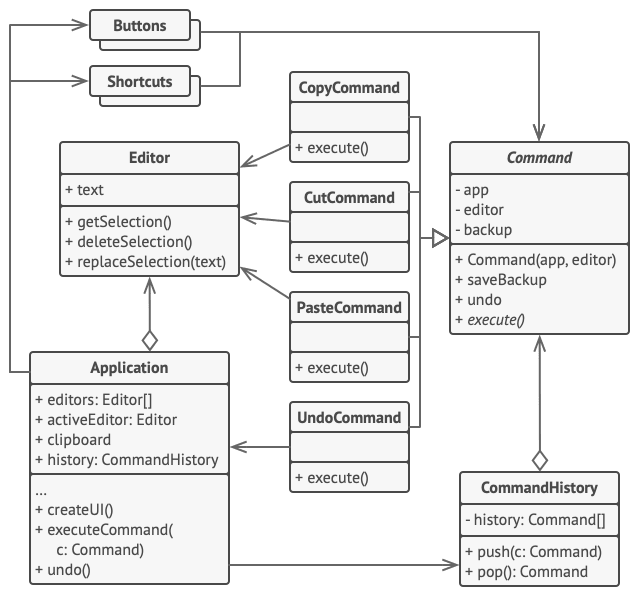
优良的软件设计通常会将关注点分离,即常用的软件分层。如编辑软件分离 GUI 与业务逻辑。命令模式将所有操作进行抽象成命令类,通过命令对象负责连接不同的 GUI 和业务逻辑对象。
命令模式使用数据对命令对象进行配置,实现不同请求参数。
UML 结构
 1
 2
 3
 4
 5
 6
 7
 8
 9
10
11
12
13
14
15
16
17
18
19
20
21
| class Invoker{
- command
+ setCommand(command)
+ executeCommand()
}
interface Command{
+ execute()
}
class Command1{
- receiver
- params
+ Command1(receiver, params)
+ execute()
}
class Receiver
class Client
Invoker o--> Command
Command1 ..|> Command
Client --> Invoker
Client --> Command1
Client --> Receiver
|
- Invoker 调用者 初始化请求
- Command 抽象命令类
- Command1 具体命令类
- Receiver 接受者 处理业务逻辑
应用示例
命令模式实现命令历史与撤销
有些命令会改变编辑器的状态 (例如剪切和粘贴),它们可在执行相关操作前对编辑器的状态进行备份。命令执行后会和当前点备份的编辑器状态一起被放入命令历史 (命令对象栈)。 此后,如果用户需要进行回滚操作,程序可从历史记录中取出最近的命令,读取相应的编辑器状态备份,然后进行恢复。
 1
 2
 3
 4
 5
 6
 7
 8
 9
10
11
12
13
14
15
16
17
18
19
20
21
22
23
24
25
26
27
28
29
30
31
32
33
34
35
36
37
38
39
40
41
42
43
44
45
46
47
48
49
50
51
52
53
54
55
56
57
58
| class Command{
- app
- editor
- backup
+ Command(app, editor)
+ saveBackup
+ undo
+ execute()
}
class Buttons
class Shortcuts
class CommandHistory{
- history: Command[]
+ push(c: Command)
+ pop(): Command
}
class CopyCommand{
+ execute()
}
class CutCommand{
+ execute()
}
class PasteCommand{
+ execute()
}
class UndoCommand{
+ execute()
}
class Editor{
+ text
+ getSelection()
+ deleteSelection()
+ replaceSelection(text)
}
class Application{
+ editors: Editor[]
+ activeEditor: Editor
+ clipboard
+ history: CommandHistory
+ createUI()
+ executeCommand)c: Command)
+ undo
}
Application o--> Editor
Application o--> CommandHistory
Application --> Buttons
Application --> Shortcuts
Buttons o--> Command
Shortcuts o--> Command
CommandHistory o--> Command
CopyCommand --|> Command
CutCommand --|> Command
PasteCommand --|> Command
UndoCommand --|> Command
CopyCommand --> Editor
CutCommand --> Editor
PasteCommand --> Editor
UndoCommand --> Application
|
  1
  2
  3
  4
  5
  6
  7
  8
  9
 10
 11
 12
 13
 14
 15
 16
 17
 18
 19
 20
 21
 22
 23
 24
 25
 26
 27
 28
 29
 30
 31
 32
 33
 34
 35
 36
 37
 38
 39
 40
 41
 42
 43
 44
 45
 46
 47
 48
 49
 50
 51
 52
 53
 54
 55
 56
 57
 58
 59
 60
 61
 62
 63
 64
 65
 66
 67
 68
 69
 70
 71
 72
 73
 74
 75
 76
 77
 78
 79
 80
 81
 82
 83
 84
 85
 86
 87
 88
 89
 90
 91
 92
 93
 94
 95
 96
 97
 98
 99
100
101
102
103
104
105
106
107
108
109
110
111
112
113
114
115
116
117
118
119
120
121
122
123
124
125
126
127
128
129
130
131
132
133
134
135
136
137
138
139
140
| #!/usr/bin/env python3
# -*- coding: utf-8 -*-
from abc import ABCMeta, abstractmethod
# 命令
class Command(metaclass=ABCMeta):
def __init__(self, app, editor):
self.app = app
self.editor = editor
self.backup = None
def save_backup(self):
self.backup = editor.text
@abstractmethod
def execute(self):
pass
class CopyCommand(Command):
def execute(self):
print(self.__class__.__name__ + 'execute')
self.app.clipboard = self.editor.get_selection()
return False
class CutCommand(Command):
def execute(self):
print(self.__class__.__name__ + 'execute')
self.save_backup()
self.app.clipboard = self.editor.get_selection()
self.editor.delete_selection()
return True
class PasteCommand(Command):
def execute(self):
print(self.__class__.__name__ + 'execute')
self.save_backup()
self.editor.repalce_selection(self.app.clipboard)
return True
class UndoCommand(Command):
def execute(self):
print(self.__class__.__name__ + 'execute')
self.app.undo()
return False
class CommandHistory(object):
def __init__(self):
self.history = list()
def push(self, c):
self.history.append(c)
def pop(self):
self.history.pop()
# 接受者
class Editor(object):
def __init__(self, *args, **kwargs):
self.text = None
def get_selection(self):
print('editor get selection')
ret = ''
if self.text:
ret = self.text
return ret
def delete_selection(self):
pass
print('editor delete selection')
class Button(object):
def __init__(self, command=None):
self.command = command
def set_command(self, command):
self.command = command
def execute(self):
if self.command:
self.command()
# 发送者
class Application(object):
def __init__(self, *args, **kwargs):
self.clipboard = None
self.editors = None
self.active_editor = Editor()
self.history = CommandHistory()
def create_ui(self, buttons):
copy_button, undo_button = buttons
copy = lambda : self.execute_command(
CopyCommand(self, self.active_editor))
copy_button.set_command(copy)
undo = lambda : self.execute_command(
UndoCommand(self, self.active_editor))
undo_button.set_command(undo)
def execute_command(self, command):
if command.execute():
self.push(command)
def undo(self):
if self.history.history:
command = self.history.pop()
if command:
command.undo()
def test_buttons(self, buttons):
for i in buttons:
i.execute()
if __name__ == '__main__':
app = Application()
copy_button = Button()
undo_button = Button()
buttons = (copy_button, undo_button)
app.create_ui(buttons)
app.test_buttons(buttons)
|
TODO
适用性
- 通过操作来参数化对象,将特定的方法调用转化为独立对象。
- 想要将操作放入队列中、 操作的执行或者远程执行操作
- 想要实现操作回滚功能
实现步骤
- 声明仅有一个执行方法的抽象命令接口
- 具体命令类实现抽象接口,类必须保存请求参数与接受者
- 实现命令发送者类,类中保存命令的成员变量
- 修改发送者使其执行命令,而非直接将请求发送给接收者
- 顺序初始化对象:接受者、创建命令、关联命令与发送者
优缺点
迭代器模式
意图
不暴露集合底层数据表现形式的情况下遍历集合中所有的元素
问题
将遍历方法写入集合类中会造成代码复杂,并且不符合高效存储的设计理念
解决方案
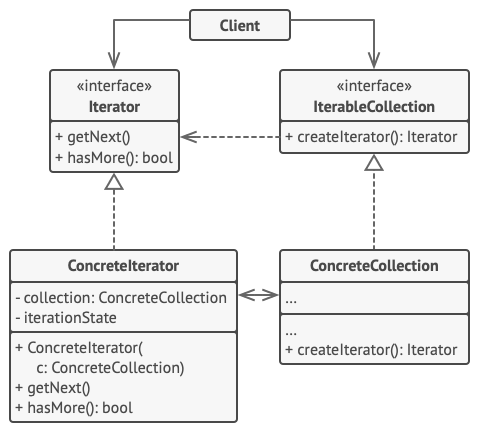
迭代器模式的主要思想是将集合的遍历行为抽取为单独的迭代器对象。
迭代器提供获取集合元素的基础方法,通过调用方法遍历集合所有元素。
迭代器实现相同的接口,如果需要新的迭代方式,按照需求新建新的迭代器类,无需修改集合代码。
UML 结构
 1
 2
 3
 4
 5
 6
 7
 8
 9
10
11
12
13
14
15
16
17
18
19
20
21
22
23
| interface Iterator{
+ getNext()
+ hasMore(): bool
}
interface IterableCollextion{
+ createIterator(): Iterator
}
class ConcreteIterator{
- collection: ConcreteCollection
- iterationState
+ ConcreteIterator(c: ConcreteCollection)
+ getNext()
+ hasMore(): bool
}
class ConcreteCollection{
+ creteIterator(): Iterator
}
class Client
Client --> IterableCollection
Client ---> Iterator
ConcreteIterator ..|> Iterator
ConcreteCollection ..|> IterableCollection
ConcreteIterator <--> ConcreteCollection
|
- Iterator 抽象迭代器接口
- IterableCollection 集合返回迭代器接口
- ConcreteIterator 具体迭代器类 需保存遍历进度
- ConcreteIterableCollection 具体返回迭代器类
应用示例
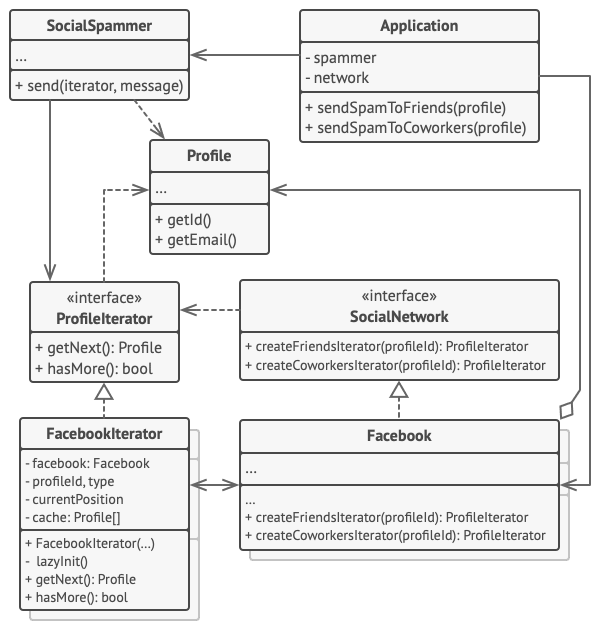
遍历一个好友关系功能的特殊集合
 1
 2
 3
 4
 5
 6
 7
 8
 9
10
11
12
13
14
15
16
17
18
19
20
21
22
23
24
25
26
27
28
29
30
31
32
33
34
35
36
37
38
39
40
41
42
43
44
45
| class Profile{
+ getId()
+ getEmail()
}
interface Iterator{
+ getNext: Profile
+ hasMore(): bool
}
interface SocialNetwork{
+ createFriendsIterator(profiledId): ProfileIterator
+ createCoworkersIterator(profiledId): ProfileIterator
}
class Facebook{
+ createFriendsIterator(profileId): ProfileIterator
+ createCoworkersIterator(profiledId): ProfileIterator
}
class FacebookIterator{
- facebook: Facebook
- profileId, type
- currentPosition
- cache: Profile[]
+ FackbookIterator()
- lazyInit()
+ getNext(): Profile
+ hasMore(): bool
}
class SocialSpammer{
+ send(iterator, message)
}
class Application{
- spammer
- network
+ sendSpamToFriends(profile)
+ sendSpanToCoworkers(profile)
}
Application --> SocialSpammer
Application --> Facebook
SocialSpammer --> Profile
SocialSpammer --> Iterator
Iterator --> Profile
FacebookIterator ..|> Iterator
FacebookIterator <--> Facebook
SocialNetwork --> Iterator
Facebook ..|> SocialNetwork
Facebook o--> Profile
|
  1
  2
  3
  4
  5
  6
  7
  8
  9
 10
 11
 12
 13
 14
 15
 16
 17
 18
 19
 20
 21
 22
 23
 24
 25
 26
 27
 28
 29
 30
 31
 32
 33
 34
 35
 36
 37
 38
 39
 40
 41
 42
 43
 44
 45
 46
 47
 48
 49
 50
 51
 52
 53
 54
 55
 56
 57
 58
 59
 60
 61
 62
 63
 64
 65
 66
 67
 68
 69
 70
 71
 72
 73
 74
 75
 76
 77
 78
 79
 80
 81
 82
 83
 84
 85
 86
 87
 88
 89
 90
 91
 92
 93
 94
 95
 96
 97
 98
 99
100
101
102
| #!/usr/bin/env python3
# -*- coding: utf-8 -*-
from abc import ABCMeta, abstractmethod
class Profile(object):
def get_id(self):
return 1
# 抽象社交网络接口
class SocialNetwork(metaclass=ABCMeta):
@abstractmethod
def create_friends_iterator(self, profile_id):
pass
@abstractmethod
def create_coworkers_iterator(self, profile_id):
pass
# 迭代器接口
class ProfileIterator(metaclass=ABCMeta):
@abstractmethod
def get_next(self):
pass
@abstractmethod
def has_more(self):
pass
# 具体迭代器
class FacebookIterator(ProfileIterator):
def __init__(self, facebook, profile_id, type_):
self.facebook = facebook
self.profile_id = profile_id
self.type_ = type_
self.current_pos = 0
self.cache = None
def lazy_init(self):
if not self.cache:
self.cache = self.facebook.social_graph_request(self.profile_id, self.type_)
def get_next(self):
if self.has_more():
ret = self.cache[self.current_pos]
self.current_pos += 1
return ret
def has_more(self):
self.lazy_init()
return len(self.cache) > self.current_pos
# 具体社交类
class Facebook(SocialNetwork):
def create_friends_iterator(self, profile_id):
return FacebookIterator(self, profile_id, 'friends')
def create_coworkers_iterator(self, profile_id):
return FacebookIterator(self, profile_id, 'coworkers')
def social_graph_request(self, profile_id, type_):
ret = [1, 2, 3]
if type_ == 'coworkers':
ret.append(4)
return ret
class SocialSpammer(object):
def send(self, iterator, message):
while iterator.has_more():
profile = iterator.get_next()
print('send email {}'.format(profile))
class Application(object):
def __init__(self, *args, **kwargs):
self.network = Facebook()
self.spammer = SocialSpammer()
def send_sapm_to_friends(self, profile):
iterator = self.network.create_friends_iterator(profile.get_id())
self.spammer.send(iterator, 'haha')
def send_spam_to_coworkers(self, profile):
iterator = self.network.create_coworkers_iterator(profile.get_id())
self.spammer.send(iterator, 'haha')
if __name__ == '__main__':
app = Application()
profile = Profile()
app.send_sapm_to_friends(profile)
app.send_spam_to_coworkers(profile)
|
适用性
- 集合背后为复杂的数据结构,希望隐藏其复杂性
- 减少程序中重复的遍历代码
- 希望代码能遍历不同的甚至是无法与之的数据结构
实现步骤
- 声明迭代器接口,至少提供获取下一个元素的方法
- 声明集合接口并描述一个获取迭代器的方法
- 使用迭代器实现具体的迭代类
- 集合中实现集合接口,提供不同创建迭代器的方法
优缺点
中介者模式
意图
减少对象之间相互依赖,通过限制对象直接交互,使用中介者进行交互。
问题
包含多个组件的对话框进行交互,如果在组件中实现组件之间动态交互与数据的校验等逻辑,会导致代码复杂无法复用。
解决方案
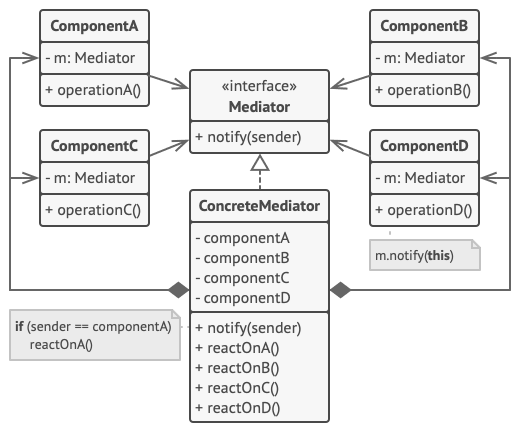
中介者模式使组件调用特殊的中介者对象, 通过中介者以间接的方式进行交互。
上个例子,将对话框作为中介者,所有部件与对话框交互,减少部件之间的依赖。
UML 结构
 1
 2
 3
 4
 5
 6
 7
 8
 9
10
11
12
13
14
15
16
17
18
19
20
21
| interface Mediator{
+ notify(sender)
}
class ComponentA{
- m: Mediator
+ opeartionA()
}
class ComponentB{
- m: Mediator
+ opeartionB()
}
class ConcreteMediator{
- componentA
- componentB
+ notify(sender)
+ reactOnA()
+ reactOnB()
}
ConcreteMediator ..|> Mediator
ConcreteMediator *--> ComponentA
ConcreteMediator *--> ComponentB
|
- Mediator 抽象中介者
- ConcreteMediator 具体中介者
- ComponentA 组件
应用示例
UI 组件交互
 1
 2
 3
 4
 5
 6
 7
 8
 9
10
11
12
13
14
15
16
17
18
19
20
21
22
23
24
25
26
27
28
29
| interface Mediator{
+ notify(sender: Component, event: string)
}
class Component{
# dialog: Mediator
+ Component(dialog)
+ click()
+ keypress()
}
class AuthenticationDialog{
title: string
loginOrRegister: bool
loginUsername, loginPassword: Textbox
regUserame, regPassword, regEmail: Textbox
ok, cancel: Button
rememerMe: Checkbox
+ AuthenticationDialog()
+ notify(sender, event)
}
class Checkbox{
+ check()
}
class Button
class Textbox
Button --|> Component
Textbox --|> Component
Checkbox --|> Component
Component <--> Mediator
AuthenticationDialog ..|> Mediator
|
 1
 2
 3
 4
 5
 6
 7
 8
 9
10
11
12
13
14
15
16
17
18
19
20
21
22
23
24
25
26
27
28
29
30
31
32
33
34
35
36
37
38
39
40
41
42
43
44
45
46
47
48
49
50
51
52
53
54
55
56
57
58
59
60
61
62
63
64
65
66
67
68
69
70
71
72
73
74
75
76
77
78
79
80
| #!/usr/bin/env python3
# -*- condig: utf-8 -*-
from abc import ABCMeta, abstractmethod
# 抽象接口
class Mediator(metaclass=ABCMeta):
@abstractmethod
def notify(self, sender, event):
pass
# 具体实现
class AuthenticationDialog(Mediator):
def __init__(self, *args, **kwargs):
self.title = None
self.login_or_register_chkbx = True
self.login_username = None
self.login_password = None
self.registration_email = None
self.registration_password = None
self.registration_email = None
self.ok_btn = None
self.cancel_btn = None
def set_chk(self, chk):
self.login_or_register_chkbx = chk
def notify(self, sender, event):
if sender == self.login_or_register_chkbx and event == 'check':
if self.login_or_register_chkbx.checked:
self.title = 'log in'
else:
self.title = 'register'
elif sender == self.ok_btn and event == 'click':
if self.login_or_register.checked:
self.title = 'click'
if self.title:
print('{}'.format(self.title))
class Component(object):
def __init__(self, dialog):
self.dialog = dialog
def click(self):
self.dialog.notify(self, 'click')
def keypress(self):
self.dialog.notify(self, 'keypress')
class Button(Component):
pass
class Textbox(Component):
pass
class Checkbox(Component):
def __init__(self, *args, **kwargs):
super().__init__(*args, **kwargs)
self.checked = True
def check(self):
self.dialog.notify(self, 'check')
if __name__ == '__main__':
ad = AuthenticationDialog()
btn = Button(ad)
chk = Checkbox(ad)
ad.set_chk(chk)
btn.click()
chk.check()
|
适用性
- 对象与对象紧密耦合时,使用中介者模式
- 组件过于依赖其他组件而无法复用是
- 不同场景下复用一些基本行为,导致您需要创建大量组件子类
实现步骤
- 找一组分离有益的耦合类
- 声明中介者接口与协议
- 实现具体中介者类
- 组件必须保存对于中介者对象的引用,构造函数传入
- 修改组件代码,使其可调用中介者通知方法,而非其他组件方法
优缺点
备忘录模式
意图
在不暴露对象实现细节的情况下保存和恢复对象之前的状态。
问题
文本编辑器除了实现简单的文字编辑还具有图片等多媒体编辑功能,软件需要提供文件的修改历史。编辑器对象需要对所需要的属性进行保存,但是会涉及到对象权限问题。
解决方案
备忘录模式将创建状态快照的工作委派给实际状态的拥有者对象。 这样拥有者对象就不再需要暴露私有属性,编辑器类也拥有其状态的完全访问权。
备忘录模式将对象的副本储存在备忘对象中,除了创建该对象的对象外,任何其他对象都无权访问内容。其他对象必须使用受限接口与备忘录进行交互, 它们可以获取快照的元数据。
UML 结构
基于嵌套类实现
 1
 2
 3
 4
 5
 6
 7
 8
 9
10
11
12
13
14
15
16
17
| class Memento{
- state
- Memento(state)
- getState()
}
class Originator{
+ save(): Memento
+ restore(m: Memento)
}
class Caretaker{
- originator
- history: Memento[]
+ doSomething()
+ undo()
}
Originator ..> Memento
Caretaker --> Memento
|
- Originator 原生类 可生成恢复快照
- Memento 备忘录
- Caretaker 负责人 负责状态相关操作
- 备忘录嵌套在原生类中
基于接口实现
 1
 2
 3
 4
 5
 6
 7
 8
 9
10
11
12
13
14
15
16
17
18
19
| interface Memeto
class ConcreteMemento{
- state
+ Memento(state)
+ getState()
}
class Originator{
- state
+ save(): Memento
+ restore(m: Memento)
}
class Client{
- origintor
- history: Memento[]
+ undo()
}
ConcreteMemento ..|> Memento
Originator ..> ConcreteMemento
Client --> Memento
|
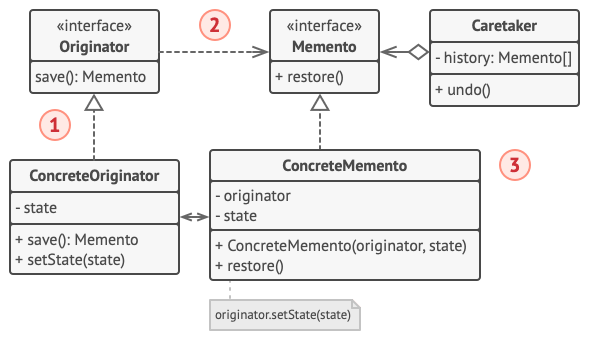
- 负责人仅可通过明确声明的中间接口与备忘录互动, 该接口仅声明与备忘录元数据相关的方法, 限制其对备忘录成员变量的直接访问权限。
- 原生类可以直接与备忘录对象进行交互, 访问备忘录类中声明的成员变量和方法。
严格封装
 1
 2
 3
 4
 5
 6
 7
 8
 9
10
11
12
13
14
15
16
17
18
19
20
21
22
23
24
25
26
| interface Originator{
save(): Memento
}
interface Memento{
+ restore()
}
class Caretaker{
- history: Memento[]
+ undo()
}
class ConcreteMemento{
- originator
- state
+ Memento(originator, state)
+ restore()
}
class ConcreteOriginator{
- state
+ save(): Memento
+ setState(state)
}
Originator ..> Memento
ConcreteOriginator ..|> Originator
Caretaker --> Memento
ConcreteMemento ..|> Memento
ConcreteOriginator <--> ConcreteMemento
|
应用示例
基于命令模式与备忘录模式,保存复杂文字编辑器的状态快照。
命令对象作为负责人,执行与命令相关的操作前获取编辑器的备忘录,在撤销时,保存其状态。
 1
 2
 3
 4
 5
 6
 7
 8
 9
10
11
12
13
14
15
16
17
18
19
20
21
22
23
24
25
26
27
28
29
30
31
32
33
34
35
36
37
38
39
40
41
42
43
44
45
46
47
48
49
50
51
52
53
54
55
56
57
58
59
60
| #!/usr/bin/env python3
# -*- coding: utf-8 -*-
class Editor(object):
def __init__(self, text=None, cur_x=None, cur_y=None, selection_width=None):
self.text = text
self.cur_x = cur_x
self.cur_y = cur_y
self.selection_width = selection_width
def set_text(self, text):
self.text = text
def set_cursor(self, x, y):
self.cur_x = x
self.cur_y = y
def set_selection_width(self, width):
self.selection_width = width
def create_snapshot(self):
print('create snap')
return Snapshot(self, self.text, self.cur_x, self.cur_y, self.selection_width)
class Snapshot(object):
def __init__(self, editor=None, text=None, cur_x=None, cur_y=None, selection_width=None):
self.editor = editor
self.text = text
self.cur_x = cur_x
self.cur_y = cur_y
self.selection_width = selection_width
def restore(self):
print('restore snap')
self.editor.set_text(self.text)
self.editor.set_cursor(self.cur_x, self.cur_y)
self.editor.set_selection_width(self.selection_width)
class Command(object):
def __init__(self, backup=None):
self.backup = backup
def make_backup(self, editor):
self.backup = editor.create_snapshot()
def undo(self, editor):
if self.backup:
self.backup.restore()
if __name__ == '__main__':
cmd = Command()
editor = Editor('text', 0, 1, 0)
cmd.make_backup(editor)
cmd.undo(editor)
|
适用性
- 需要创建对象快照恢复其之前的状态
- 直接访问对象成员变量破坏封装特性时
实现步骤
- 确认原生类
- 创建备忘录类
- 将备忘录类设为不可变,备忘录只能通过构造函数一次性接收数据
- 可通过嵌套类或接口的方式创建备忘录类的关键关系
- 原生类中添加创建备忘录的方法、添加恢复自身状态的方法
- 负责人类处理具体如何被触发创建备忘录和恢复备忘录的逻辑
优缺点
观察者模式
意图
允许你定义一种订阅机制, 可在对象事件发生时通知多个 “观察” 该对象的其他对象。
问题
商店到货通知,要么让顾客浪费时间检查产品是否到货, 要么让商店浪费资源去通知没有需求的顾客。
解决方案
将自身状态改变通知其他对象称为发布者,关注发布者状态变化的称为订阅者。
发布者实现订阅机制,一、存储订阅者对象引用的列表成员变量,二、实现列表增删的公共方法。
为了实现通知订阅者,需要订阅者实现相同的接口,以便发布者通过该接口与订阅者交互。
UML 结构
 1
 2
 3
 4
 5
 6
 7
 8
 9
10
11
12
13
14
15
16
17
| interface Subscriber{
+ update()
}
class Publisher{
- subscribers: Subscriber[]
- mainState
+ subscribe(s: Subscriber)
+ unsubscribe(s: Subscriber)
+ notifySubscribers()
+ mainBusinessLogic()
}
class ConcreteSubscribers{
+ update(publisher)
}
ConcreteSubscribers ..|> Subscriber
Publisher o--> Subscriber
Client --> Publisher
|
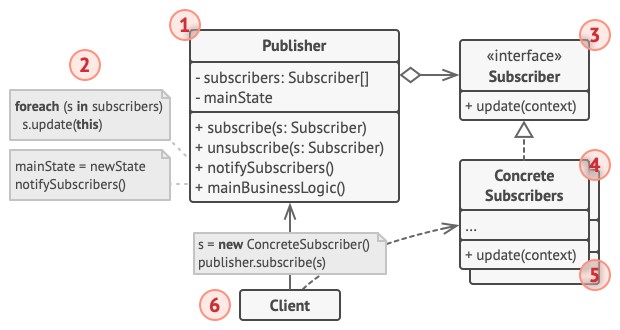
- Publisher 发布者 触发事件
- Subscriber 订阅者 抽象接口
- ConcreteSubscriber 具体订阅者 接收事件
应用示例
文本编辑器将自身状态通知其他服务
 1
 2
 3
 4
 5
 6
 7
 8
 9
10
11
12
13
14
15
16
17
18
19
20
21
22
23
24
25
| interface EventListeners{
+ update(filename)
}
class Editor{
- eventManager
+ Editor()
+ openFile()
+ saveFile()
}
class EventManager{
- listeners
+ subscribe(eventType, listener)
+ unsubscribe(eventType, listener)
+ notify(eventType, data)
}
class EmainAlertsListener{
+ update(filename)
}
class LogginListener{
+ update(filename)
}
Editor o--> EventManager
EventManager o--> EventListeners
EmailAlertsListener ..|> EventListeners
LoggingListener ..|> EventListeners
|
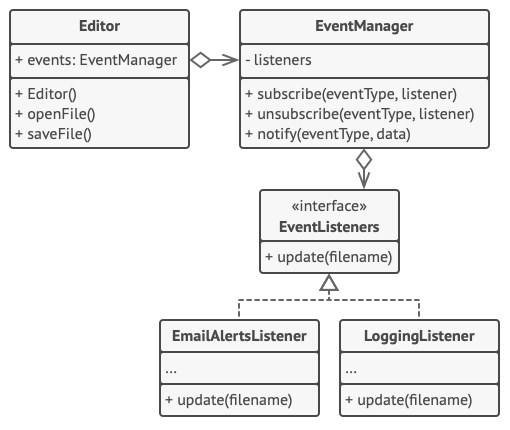
只要发布者通过同样的接口与所有订阅者进行交互, 那么在程序中新增订阅者时就无需修改已有发布者类的代码。
 1
 2
 3
 4
 5
 6
 7
 8
 9
10
11
12
13
14
15
16
17
18
19
20
21
22
23
24
25
26
27
28
29
30
31
32
33
34
35
36
37
38
39
40
41
42
43
44
45
46
47
48
49
50
51
52
53
54
55
56
57
58
59
60
61
62
63
64
65
66
67
68
69
70
71
72
| #!/usr/bin/env python
# -*- coding: utf-8 -*-
from collections import defaultdict
from abc import ABCMeta, abstractmethod
class EventManager(object):
def __init__(self, *args, **kwargs):
self._listeners = defaultdict(list)
def subscribe(self, event_type, listener):
self._listeners[event_type].append(listener)
def unsubscribe(self, event_type, listener):
self._listeners[event_type].remove(listener)
def notify(self, event_type, data):
for i in self._listeners[event_type]:
i.update(data)
class Editor(object):
def __init__(self, *args, **kwargs):
self.file = None
self.events = EventManager()
def open_file(self, path):
self.file = 'open file'
self.events.notify('open', self.file)
def save_file(self):
self.file = 'write file'
self.events.notify('save', self.file)
class EventListener(metaclass=ABCMeta):
@abstractmethod
def update(self, file_name):
pass
class LoggingListener(EventListener):
def __init__(self, log_file_name, message):
self.log = log_file_name
self.message = message
def update(self, file_name):
print('{} {} update'.format(self.log, file_name))
class EmailAlertsListener(EventListener):
def __init__(self, email, message):
self.email = email
self.message = message
def update(self, file_name):
print('{} {} update'.format(self.email, file_name))
if __name__ == '__main__':
editor = Editor()
logger = LoggingListener('log', 'file 1')
editor.events.subscribe('open', logger)
email = EmailAlertsListener('email', 'haha')
editor.events.subscribe('save', email)
editor.open_file('file2')
editor.save_file()
|
适用性
- 当一个对象状态的改变需要改变其他对象,或实际对象是事先未知的或动态变化的,可以使用观察者模式
- 当应用中的一些对象必须观察其他对象是,可以使用该模式
实现步骤
- 声明订阅者接口,至少声明一个 update 方法
- 声明发布者接口并定义一些接口来管理订阅对象
- 实现订阅方法
- 创建发布者类,每次事件发生需要通知订阅者
- 在具体订阅类中实现通知更新的方法
- 客户端必须生成全部订阅者,并在相应的发布者处完成注册工作
优缺点
状态模式
意图
当对象的内部状态变化时改变其行为, 使其看上去就像改变了自身所属的类一样。
问题
相近概念:有限状态机
程序在任何时刻仅可处于几种有限的状态中,在任何一个特定状态中,程序的行为都不相同, 且可瞬间从一个状态切换到另一个状态。
基于条件语句的状态机,为了能根据当前状态选择完成相应行为的方法会包含复杂的条件语句。 修改其转换逻辑可能会涉及到修改所有方法中的状态条件语句, 导致代码的维护工作非常艰难。
解决方案
创建包含所有状态的类,然后将所有状态的对应行为抽取到这些类中。原始对象作为上下文对象,保存指向状态对象的引用,且将所有与状态相关的工作委派给该对象。
UML 结构
 1
 2
 3
 4
 5
 6
 7
 8
 9
10
11
12
13
14
15
16
17
18
19
20
21
22
23
| interface State{
+ doThis()
+ doThat()
}
class ConcreteStates{
- context
+ setContext(context)
+ doThis()
+ doThat()
}
class Context{
- state
+ Context(initialState)
+ changeState(state)
+ doThis()
+ doThat()
}
class Client
Client --> Context
Client --> ConcreteStates
ConcreteStates --|> State
ConcreteStates --> Context
Context o--> State
|
- State 抽象状态接口
- ConcreteStates 具体状态类 包含所有需要状态
- Context 上下文 切换状态
应用示例
状态模式将根据当前回放状态, 让媒体播放器中的相同控件完成不同的行为。
 1
 2
 3
 4
 5
 6
 7
 8
 9
10
11
12
13
14
15
16
17
18
19
20
21
22
23
24
25
| class State{
- player
+ State(player)
+ clickLock()
+ clickPlay()
+ clickNext()
+ clickPrevious()
}
class Player{
- state
+ UI,volume,playlist,currentSong
+ Player()
+ changeState(state)
+ clickLock()
+ clickPlay()
+ clickNext()
+ clickPrevious()
+ startPlayback()
+ stopPlayback()
+ nextSong()
+ previousSong()
+ fastForward()
+ rewind()
}
Player o--> State
|
  1
  2
  3
  4
  5
  6
  7
  8
  9
 10
 11
 12
 13
 14
 15
 16
 17
 18
 19
 20
 21
 22
 23
 24
 25
 26
 27
 28
 29
 30
 31
 32
 33
 34
 35
 36
 37
 38
 39
 40
 41
 42
 43
 44
 45
 46
 47
 48
 49
 50
 51
 52
 53
 54
 55
 56
 57
 58
 59
 60
 61
 62
 63
 64
 65
 66
 67
 68
 69
 70
 71
 72
 73
 74
 75
 76
 77
 78
 79
 80
 81
 82
 83
 84
 85
 86
 87
 88
 89
 90
 91
 92
 93
 94
 95
 96
 97
 98
 99
100
101
102
103
104
105
106
| #!/usr/bin/env python3
from abc import ABCMeta, abstractmethod
class AudioPlay(object):
def __init__(self, *args, **kwargs):
self.state = ReadyState(self)
self.UI = 'UI'
def change_state(self, state):
self.state = state
def click_lock(self):
self.state.click_lock()
def click_play(self):
self.state.click_play()
def click_next(self):
self.state.click_next()
def click_previous(self):
self.state.click_previous()
class State(metaclass=ABCMeta):
def __init__(self, player):
self.player = player
@abstractmethod
def click_lock(self):
pass
@abstractmethod
def click_play(self):
pass
@abstractmethod
def click_next(self):
pass
@abstractmethod
def click_previous(self):
pass
class LockedState(State):
def click_lock(self):
if self.player.playing:
self.player.change_state(PlayingState(self.player))
else:
self.player.change_state(ReadyState(self.player))
def click_next(self):
return super().click_next()
def click_play(self):
return super().click_play()
def click_previous(self):
return super().click_previous()
class ReadyState(State):
def click_lock(self):
self.player.change_state(LockedState(self.player))
def click_next(self):
print('next song')
def click_previous(self):
print('previous song')
def click_play(self):
print('play song')
class PlayingState(State):
def click_lock(self):
self.player.change_state(LockedState(self.player))
def click_play(self):
print('stop play')
self.player.change_state(ReadyState(self.player))
def click_next(self):
print('next song')
def click_previous(self):
print('previous song')
if __name__ == '__main__':
play = AudioPlay()
play.click_next()
play.click_previous()
play.click_play()
play.click_lock()
play.click_next()
play.click_previous()
play.click_play()
|
适用性
- 如果对象需要根据自身当前状态进行不同行为,同时状态的数量非常多且与状态相关的代码会频繁变更
- 如果某个类需要根据成员变量的当前值改变自身行为,需要使用大量的条件语句
- 当相似状态和基于条件的状态机转换中存在许多重复代码
实现步骤
优缺点
策略模式
意图
定义一系列算法, 并将每种算法分别放入独立的类中, 以使算法的对象能够相互替换。
问题
实现自动导航的导游程序,首次实现了公交版的路线规划,随后增加了骑行者者版本的路线规划,随着需求越来越多,代码量增加可维护性下降。
解决方案
策略模式找出负责用许多不同方式完成特定任务的类, 然后将其中的算法抽取到一组被称为策略的独立类中。
上下文的原始类必须包含一个成员变量来存储对于每种策略的引用。 上下文并不执行任务, 而是将工作委派给已连接的策略对象。
UML 结构
 1
 2
 3
 4
 5
 6
 7
 8
 9
10
11
12
13
14
15
16
| interface Strategy{
+ execute(data)
}
class ConcreteStrategies{
+ execute(data)
}
class Context{
- strategy
+ setStrategy(strategy)
+ doSomething()
}
class Client
Client --> Context
Client --> ConcreteStrategies
Context o--> Strategy
ConcreteStrategies ..|> Strategy
|
- Strategy 抽象策略类
- ConcreteStrategies 具体策略类
- Context 上下文 维护指向具体策略的引用,上下文不清楚其所涉及的策略类型与算法的执行方式
应用示例
 1
 2
 3
 4
 5
 6
 7
 8
 9
10
11
12
13
14
15
16
17
18
19
20
21
22
23
24
25
26
27
28
29
30
31
32
33
34
35
36
37
38
39
40
41
42
43
44
45
46
47
48
49
50
51
52
53
54
55
56
57
58
59
60
61
62
63
64
65
| #!/usr/bin/env python3
from abc import ABCMeta, abstractmethod
class Strategy(metaclass=ABCMeta):
@abstractmethod
def execute(self, *args, **kwargs):
pass
class ConcreteStrategyAdd(Strategy):
def execute(self, *args, **kwargs):
ret = 0
for i in args:
ret += int(i)
return ret
class ConcreteStrategySubtract(Strategy):
def execute(self, *args, **kwargs):
ret = args[0]
for i in args[1:]:
ret -= int(i)
return ret
class ConcreteStrategyMultiply(Strategy):
def execute(self, *args, **kwargs):
ret = 1
for i in args:
ret *= int(i)
return ret
class Context(object):
def __init__(self, strategy=None):
super().__init__()
self.strategy = strategy
def set_strategy(self, strategy):
self.strategy = strategy
def execute_strategy(self, *args):
return self.strategy.execute(*args)
if __name__ == '__main__':
a = 10
b = 20
context = Context()
context.set_strategy(ConcreteStrategyAdd())
print(context.execute_strategy(a, b))
context.set_strategy(ConcreteStrategySubtract())
print(context.execute_strategy(a, b))
context.set_strategy(ConcreteStrategyMultiply())
print(context.execute_strategy(a, b))
|
适用性
- 当你想使用对象中各种不同的算法变体, 并希望能在运行时切换算法时, 可使用策略模式。
- 当你有许多仅在执行某些行为时略有不同的相似类时, 可使用策略模式。
- 如果算法在逻辑的上下文中不是特别重要, 使用该模式能将类的业务逻辑与其算法实现细节隔离开来。
- 当类中使用了复杂条件运算符以在同一算法的不同变体中切换时, 可使用该模式。
实现步骤
- 上下文中修改频率较高的算法
- 声明该算法的通用接口
- 实现具体策略类
- 上下文类中添加一个成员变量用于保存对于策略对象的引用。 然后提供设置方法
优缺点
模版方法模式
意图
超类中定义了一个算法的框架, 允许子类在不修改结构的情况下重写算法的特定步骤。
问题
编写文档数据提取工具,首个版本仅支持 DOC 文件,随后增加了 CSV、PDF 文件的支持。
发现这三个类中包含许多相似代码。 尽管这些类处理不同数据格式的代码完全不同, 但数据处理和分析的代码却几乎完全一样。并且客户端中包含了很多条件语句。
解决方案
模板方法模式建议将算法分解为一系列步骤, 然后将这些步骤改写为方法, 最后在 “模板方法” 中依次调用这些方法。步骤可以是抽象的, 也可以有一些默认的实现。为了能够使用算法, 客户端需要自行提供子类并实现所有的抽象步骤。 如有必要还需重写一些步骤(不包括模板方法)。
UML 结构
 1
 2
 3
 4
 5
 6
 7
 8
 9
10
11
12
13
14
15
16
| class AbstractClass{
+ templateMethod()
+ step1()
+ step2()
+ step3()
}
class ConcreteClass1{
+ step2()
+ step3()
}
class ConcreteClass2{
+ step1()
+ step2()
}
ConcreteClass1 --|> AbstractClass
ConcreteClass2 --|> AbstractClass
|
应用示例
AI 策略类游戏
 1
 2
 3
 4
 5
 6
 7
 8
 9
10
11
12
13
14
15
16
17
18
19
20
21
22
23
24
25
26
27
28
29
30
31
32
33
34
35
36
37
38
39
40
41
42
43
44
45
46
47
48
49
50
51
52
53
54
55
56
57
58
59
60
61
62
63
64
65
66
67
68
69
70
71
72
73
74
75
76
| #!/usr/bin/env python3
from abc import ABCMeta, abstractmethod
class GameAI(object):
@abstractmethod
def build_structures(self):
pass
@abstractmethod
def build_units(self):
pass
@abstractmethod
def send_scouts(self, position):
pass
@abstractmethod
def send_warriors(self, position):
pass
def closest_enemy(self):
return True
def collection_resources(self):
for i in self.build_structures():
print('collection {}'.format(i))
def attack(self):
enemy = self.closest_enemy()
if enemy:
self.send_warriors('x1')
else:
self.send_scouts('y1')
def turn(self):
# template method
self.collection_resources()
self.build_structures()
self.build_units()
self.attack()
class OrcsAI(GameAI):
def build_structures(self):
return ['a', 'b', 'c']
def build_units(self):
return ['u1', 'u2', 'u3']
def send_scouts(self, position):
print('{} send scouts to {}'.format(self.__class__.__name__, position))
def send_warriors(self, position):
print('{} send warriors to {}'.format(self.__class__.__name__, position))
class MonstersAI(GameAI):
def collection_resources(self):
pass
def build_structures(self):
pass
def build_units(self):
pass
if __name__ == '__main__':
orcs_ai = OrcsAI()
orcs_ai.turn()
monsters_ai = MonstersAI()
monsters_ai.turn()
|
适用性
- 希望客户端扩展某个特定算法步骤, 而不是整个算法或其结构
- 多个类的算法除一些细微不同之外几乎完全一样时, 你可使用该模式。 但其后果就是, 只要算法发生变化, 你就可能需要修改所有的类。
实现步骤
- 分析目标算法, 确定能否将其分解为多个步骤
- 创建抽象基类并声明一个模板方法和代表算法步骤的一系列抽象方法
- 可考虑在算法的关键步骤之间添加钩子,改变算法流程
- 为每个算法变体新建一个具体子类, 实现抽象步骤
优缺点
访问者模式
意图
访问者的目的是让你能为整个类层次结构添加 “外部” 操作, 而无需修改这些类的已有代码。
问题
已有的地图产品需要实现地图节点 XML 导出模块,可以修改原有的类实现导出功能,但是可能引入潜在的风险
解决方案
访问者模式建议将新行为放入一个名为访问者的独立类中, 而不是试图将其整合到已有类中。 现在, 需要执行操作的原始对象将作为参数被传递给访问者中的方法, 让方法能访问对象所包含的一切必要数据。
访问者类访问不同的节点对象时,由于节点对象各自处理方法不同,需要进行判断。访问模式实现了双分派技巧,将处理的方法委派给作为参数传递给访问者的节点对象
UML 结构
 1
 2
 3
 4
 5
 6
 7
 8
 9
10
11
12
13
14
15
16
17
18
19
20
21
22
23
24
25
26
27
28
| interface Visitor{
+ visit(e: ElementA)
+ visit(e: ElementB)
}
interface Element{
+ accept(v: Visitor)
}
class ElementA{
+ featureA()
+ accept(v: Visitor)
}
class ElementB{
+ featureB()
+ accept(v: Visitor)
}
class ConcreteVisitors{
+ visit(e: ElementA)
+ visit(e: ElementB)
}
class Client
Client --> ConcreteVisitors
Client --> Element
Element --> Visitor
Visitor --> ElementA
Visitor --> ElementB
ConcreteVisitors ..|> Visitor
ElementA ..|> Element
ElementB ..|> Element
|
- Visitor 抽象接口声明节点对象访问方法
- Element 抽象节点声明接收访问者的方法
- ElementA 具体节点类
- ConcreteVisitors 具体访问者
应用示例
几何图像层次结构添加了对于 XML 文件导出功能
 1
 2
 3
 4
 5
 6
 7
 8
 9
10
11
12
13
14
15
16
17
18
19
20
21
22
23
24
25
26
27
28
29
| interface Visitor{
+ visitDot(d: Dot)
+ visitCircle(c: Circle)
+ visitRectangle(r: Rectangle)
+ visitCompundGraphic(cs: CompoundGraphic)
}
interface Shape{
+ move(x, y)
+ draw()
+ accept(v: Visitor)
}
class Dot
class Circle
class Rectangle
class CompundGraphic
class XMLExportVisitor{
+ visitDot(d: Dot)
+ visitCircle(c: Circle)
+ visitRectangle(r: Rectangle)
+ visitCompundGraphic(cs: CompoundGraphic)
}
class Application
Application --> XMLExportVisitor
Application --> Shape
Shape --> Visitor
Visitor --> Dot
Visitor --> Circle
Visitor --> Rectangle
Visitor --> CompundGraphic
|
visitor and double dispatch
 1
 2
 3
 4
 5
 6
 7
 8
 9
10
11
12
13
14
15
16
17
18
19
20
21
22
23
24
25
26
27
28
29
30
31
32
33
34
35
36
37
38
39
40
41
42
43
44
45
46
47
48
49
50
51
52
53
54
55
56
57
58
59
60
61
62
63
64
65
66
67
68
69
70
71
72
73
74
75
76
77
78
79
80
81
82
83
84
85
86
87
88
89
| #!/usr/bin/env python3
from abc import ABCMeta, abstractmethod
class Shape(metaclass=ABCMeta):
# @abstractmethod
# def move(self, x, y):
# pass
# @abstractmethod
# def draw(self):
# pass
@abstractmethod
def accept(self, visitor):
pass
class Visitor(metaclass=ABCMeta):
@abstractmethod
def visitDot(self, shape):
pass
@abstractmethod
def visitCircle(self, shape):
pass
@abstractmethod
def visitRectangle(self, shape):
pass
@abstractmethod
def visitCompoundShape(self, shape):
pass
class Dot(Shape):
def accept(self, visitor):
print('class: {}, visitor: {}'.format(self.__class__.__name__, visitor))
visitor.visitDot(self)
class Circle(Shape):
def accept(self, visitor):
print('class: {}, visitor: {}'.format(self.__class__.__name__, visitor))
visitor.visitCircle(self)
class Rectangle(Shape):
def accept(self, visitor):
print('class: {}, visitor: {}'.format(self.__class__.__name__, visitor))
visitor.visitRectangle(self)
class CompoundShape(Shape):
def accept(self, visitor):
print('class: {}, visitor: {}'.format(self.__class__.__name__, visitor))
visitor.visitCompoundShape(self)
class XMLExportVisitor(Visitor):
def visitDot(self, shape):
print('class: {}, self: {}'.format(self.__class__.__name__, self))
def visitCircle(self, shape):
print('class: {}, self: {}'.format(self.__class__.__name__, self))
def visitRectangle(self, shape):
super().visitRectangle(shape)
print('class: {}, self: {}'.format(self.__class__.__name__, self))
def visitCompoundShape(self, shape):
super().visitCompoundShape(shape)
print('class: {}, self: {}'.format(self.__class__.__name__, self))
if __name__ == '__main__':
export_visitor = XMLExportVisitor()
shapes = [Dot(), Circle(), Rectangle(), CompoundShape()]
for shape in shapes:
shape.accept(export_visitor)
|
适用性
- 对一个复杂对象结构 (例如对象树) 中的所有元素执行某些操作, 可使用访问者模式。
- 可使用访问者模式来清理辅助行为的业务逻辑。
- 当某个行为仅在类层次结构中的一些类中有意义, 而在其他类中没有意义时, 可使用该模式。
实现步骤
- 在访问者接口中声明一组 “访问” 方法, 分别对应程序中的每个具体元素类。
- 声明元素接口,该方法必须接受访问者对象作为参数。
- 在所有具体元素类中实现接收方法。 这些方法必须将调用重定向到当前元素对应的访问者对象中的访问者方法上。
- 元素类只能通过访问者接口与访问者进行交互。
- 为每个无法在元素层次结构中实现的行为创建一个具体访问者类并实现所有的访问者方法。
优缺点
Reference